
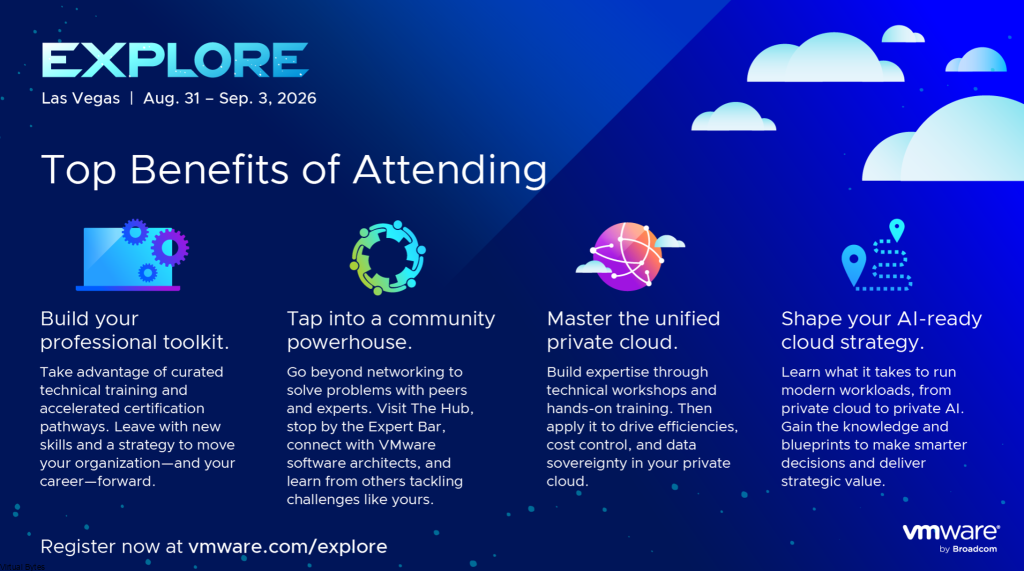
VMware Explore 2026 runs August 31 – September 3 at The Venetian in Las Vegas, and for once the calendar is working in our favor. VCF 9.1 went GA back in May, which means by the time we’re all badged up and on the show floor, the sessions won’t be teasing a roadmap — they’ll be unpacking what a few months of production has actually taught everyone.
That’s the difference that matters. A polished demo shows you the happy path. A breakout three months after GA is where someone finally admits what broke at 2 a.m. during a maintenance window, and how they worked around it. This year leans toward the second kind, and that’s exactly why it’s worth the trip.
This guide is written for the people who run the platform — VCF, NSX, vSAN, in production, on a finite maintenance-window budget — not for the people who write the press releases. Here’s how I’d spend the week.
TL;DR
- When/where: August 31 – September 3, 2026, The Venetian Convention and Expo Center, Las Vegas.
- The timing advantage: VCF 9.1 is already GA, so expect field-experience sessions, not roadmap previews.
- The real agenda: operational maturity — live patching, parallel upgrade scale, memory tiering, encrypted vMotion offload — not the AI headline.
- Spend your time on: Hands-on Labs, certification vouchers, Quick Talks, and The Hub. Breakouts land on demand within days; lab seats and exam slots don’t.
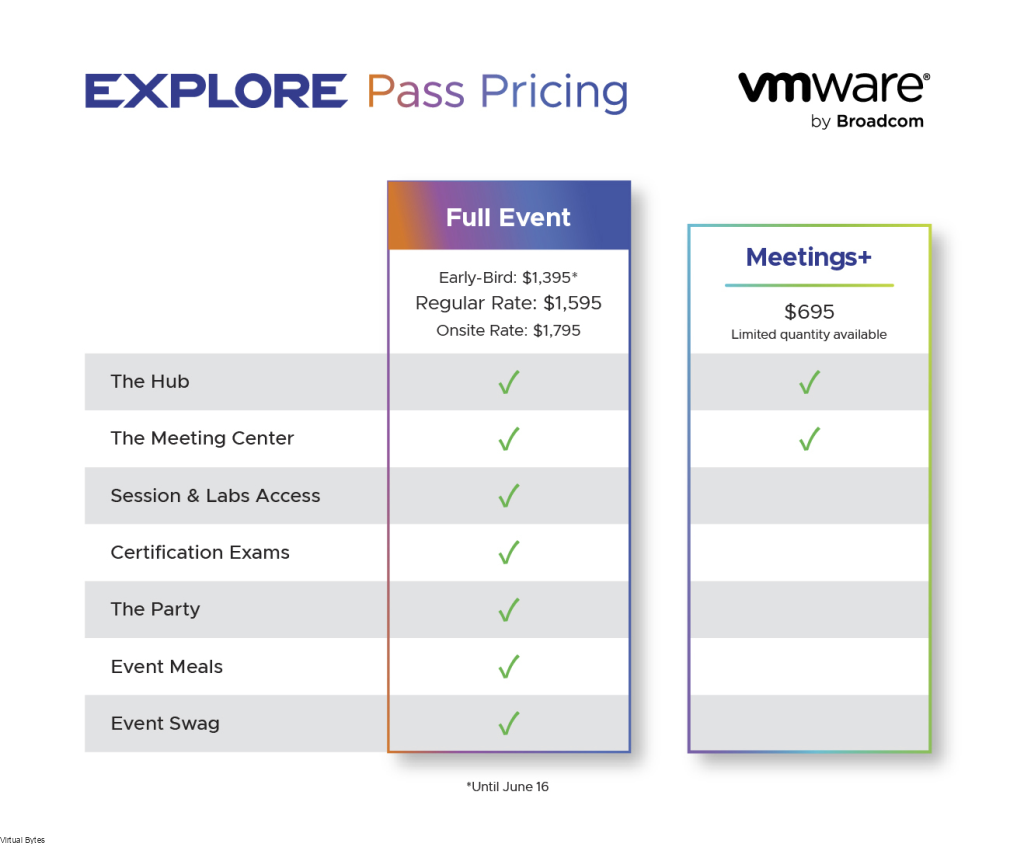
- Register: early-bird pricing saves $200 on the Full Event Pass through June 16 (VMUG Advantage members save another $100); the content catalog opens June 23.
- Bring a list of pointed questions for the engineers, and treat every vendor TCO figure as a claim to validate against your own workload mix.
- Can’t make Vegas? Explore on Tour is hitting several cities, including a new U.S. public-sector stop.
The storyline that’ll dominate: VCF 9.1 with real miles on it
If 2025 was the “here’s the vision” year for the 9.x line, 2026 is the “here’s how it actually behaves” year. One storyline will eat most of the agenda — VCF 9.1 and the AI-native private cloud — but the part that earns floor time for most of us isn’t the AI framing. It’s the operational maturity underneath it.
Broadcom has organized the 2026 catalog around four official tracks — Cloud Infrastructure, Security, App Modernization, and Innovation — and that’s how the breakouts will be filed, so plan your filtering along those lines.
These are the items I’d build my breakout schedule around, because each one changes how you actually operate the platform:
- NVMe memory tiering. A unified memory model that keeps hot pages in DRAM and offloads colder ones to NVMe. Broadcom is putting a number on it — up to ~40% lower server TCO and higher consolidation. Worth chasing in a breakout if you run memory-bound estates (big databases, large VM fleets, mixed inference workloads).
- vSAN global dedup and enhanced compression. Continuous, background, works in encrypted environments, with a claimed ~39% storage TCO reduction. If you’re already on vSAN, this is a software upgrade away from real capacity headroom without a hardware refresh.
- Hardware-offloaded encrypted vMotion. Intel QuickAssist takes over the crypto work, with claims of roughly ~70% CPU savings during migrations. The quiet win here is that encrypted vMotion finally gets cheap enough to leave on as a default instead of a “sensitive workloads only” exception.
- Live patching maturity. 9.0 introduced it with real gaps; 9.1 widens the supported scenarios. Broadcom’s headline is up to ~80% of patch cases handled without host evacuation. Aspirational, sure — but even shaving half your patches off the maintenance calendar is a genuine SLA win.
- 4× faster parallel cluster upgrades. The bigger parallel lifecycle ceiling changes the math for medium-to-large fleets. Multi-weekend windows for 100+ clusters should compress hard, with wall-clock time dominated by your slowest cluster rather than serialization overhead.
- 5,000 ESX hosts per instance (2× from 9.0). Irrelevant in the homelab, but a real instance-consolidation conversation for big estates — fewer endpoints, fewer certs, fewer upgrade cycles. Just remember a bigger blast radius cuts both ways. Plan your fault domains.
- vCenter-as-a-workload-domain. VCF Operations can now wrap an existing vSphere 8.0 U3+ environment for lifecycle management. If “we can’t move to VCF until the vSphere refresh is done” has been your blocker, this quietly removes it.
- vSAN replication from any source (VMFS, NFS, or vSAN into a vSAN target), plus vSAN for Recovery tying deep snapshots to integrated replication for DR and ransomware scenarios.
- vDefend at scale — multi-Tbps threat inspection per instance, a big jump in app IDs, and distributed IDS/IPS finally extending to Kubernetes workloads, closing the VM-vs-container blind spot.
- VKS scaling to 500 clusters per Supervisor, plus live application-stack blueprints that turn a running multi-VM app into a reusable template.
- CrowdStrike Falcon clean-room recovery — recovered workloads get scanned in isolated environments before returning to production. If you’ve ever wondered whether your “clean” backups were actually clean, this is the workflow.
None of these are revolutions. Collectively, they’re a maturity release aimed squarely at reducing operational friction and TCO at scale — and the signal that matters is that Broadcom is clearly investing in the platform, not coasting.
A word on the AI track
AI will be the marketing headline, and if you’re actively building private AI there’s real substance to dig into — open accelerator choice across NVIDIA and AMD, DirectPath enablement, CPU-based inferencing for proof-of-concept work, and an AI metrics observability dashboard. Go to those sessions if that’s your roadmap.
But if you’re not building private AI infrastructure, none of it changes your day job, and you shouldn’t let “AI-native” framing pressure you into an upgrade timeline that doesn’t fit your environment. Let the operational features drive that decision.
The practitioner’s playbook for the week
The single biggest mistake at Explore is treating it like a lecture series. Almost every breakout shows up on demand within days. The things that don’t scale — lab seats, exam vouchers, and time with the people who built the product — are what you should be optimizing for.
Hands-on Labs and certs first, breakouts second. Pre-book your Hands-on Labs the moment the catalog opens, and grab any certification slots early. Recorded content waits for you; a lab pod and a proctored exam seat do not. If you’ve been circling the VCF networking or operations certs, this is the cheapest, most concentrated environment to knock one out — and the Full Event Pass throws in a complimentary VCF certification exam voucher, so you may already have one waiting.
Don’t sleep on the Quick Talks. Fifteen to twenty minutes, engineer-led, and you can fit four of them in the time one breakout eats. They’re frequently more honest and more technical than the polished sessions, because there’s no room for fluff.
The hallway track beats the Expo floor. The Hub — where vExperts, VMUG leaders, and engineers actually hang out — is where you find out what’s genuinely stable and what’s still rough. That intel is worth more than any vendor booth pitch. Make a point of introducing yourself to people doing the same job you are; comparing scars is how everyone gets better.
Protect time to synthesize before you fly home. Block an hour late in the week, before the Vegas exit chaos, and write down the three things you’re actually going to do when you’re back at your desk. Without that, the whole week evaporates into a stack of business cards and a vague sense that something was important.
Questions worth cornering an engineer with
This is where Explore pays for itself. Come with a list. The vendor numbers above are claims until someone defends them in front of you — so make them. A few I’d be asking this year:
- Live patching: Which patch classes are genuinely covered without host evacuation, and what’s still excluded? The 80% headline only matters if my actual patch mix lands inside it.
- Parallel upgrades: What’s the real parallel cluster cap, and does wall-clock time collapse the way the math implies on a 100+ cluster estate, or do dependencies serialize it anyway?
- Encrypted vMotion offload: What’s the exact HCL? Which NIC and CPU generations expose Intel QuickAssist, and what’s the graceful fallback if my hardware doesn’t?
- NVMe memory tiering: Does the ~40% hold up on memory-bound database workloads, or is it a favorable demo mix? And what’s the failure behavior of the new software mirroring?
- vSAN native S3: Production-ready or pilot-only right now? What are the durability and consistency guarantees before I point a CI/CD pipeline at it?
- vCenter-as-workload-domain: What’s the supported scope when wrapping a vSphere 8.0 U3+ environment, and where are the feature gaps versus a native workload domain?
- Licensing reality: Which 9.1 capabilities are gated behind Advanced Services for VCF (vDefend, Avi Load Balancer, ACC)? Map features to entitlement before you plan a rollout, not after.
If you only do one prep task before Vegas, make it this list. Tailor it to your estate.
Registration, passes, and key dates
Explore is an in-person event, and registration has been open since late April. There are three pass tiers in 2026 — pick the one that matches how you actually plan to spend the week:
- Full Event Pass — the whole event: the plenary session, breakout sessions, Hands-on Labs, certifications, The Party, The Hub, event meals, and the collector’s edition backpack. It’s also the only tier that includes a complimentary VCF certification exam voucher. For anyone running VCF in production, this is the one that pays for itself.
- Essentials Pass — a streamlined option: breakout sessions, exhibitor access, business meetings, the plenary session, and The Hub, without the full labs-and-certs bundle. Good if your budget won’t stretch to the full pass but you still want the session content.
- Meetings+ Pass — built for partners and deal-makers: The Hub, Community Sessions, the plenary session, and The Meeting Center for one-on-ones. Note the limits — with a Meetings+ Pass you can’t pre-schedule sessions or attend sessions outside The Hub, so don’t buy it expecting breakout access.
Pricing and discounts:
- Early-bird pricing saves $200 on the Full Event Pass through June 16. If you’re reading this around publish time, that window is basically closing now, so don’t sit on it.
- VMUG Advantage members save an additional $100 — stack it with the early-bird discount.
- Group rates are available; check the official pricing page for tiers and exact figures.
- The Party is included with the Full Event Pass. Attendees with an Essentials Pass or Meetings+ Pass can add it on for $250, and guest passes (purchasable only by an attendee with a Full Event Pass) run $250 as well.
- Exact pass prices and the full inclusion matrix live on the official pricing page. For reference, the Meetings+ Pass was $695 in 2025 — confirm the 2026 number before you budget.
Dates worth putting on the calendar:
- June 16 — last day for the $200 early-bird discount on the Full Event Pass.
- June 23 — the content catalog goes live (breakout sessions, Hands-on Labs, and more).
- July 21 — session pre-scheduling opens for anyone with a completed Full Event Pass registration. Sessions fill fast; build your schedule early.
- July 28, 6:00 PM PDT — refund cutoff. Full refund before, none after (group and SKU purchases are non-refundable).
- August 31 – September 3 — the event itself.
One more thing that should shape how you spend your hours onsite: the plenary session, breakout sessions, tutorials, and Quick Talks are all recorded and available on demand right after the event. The labs, the certs, and the conversations in The Hub are not. Spend your live time accordingly.
Explore on Tour 2026
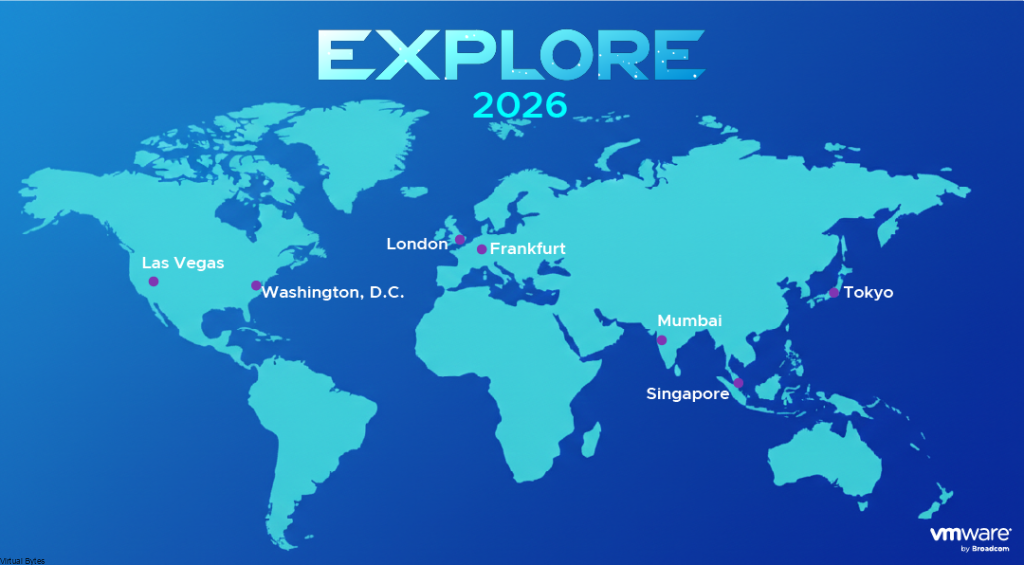
If a Vegas trip isn’t viable — budget, travel, timing — Explore on Tour is taking a condensed version on the road. Stops include Mumbai, Singapore, Tokyo, Frankfurt, London, and, new this year, Washington, D.C. on December 8 at the Ronald Reagan Building, tailored to U.S. public sector as well as state and local government. Each stop delivers a curated subset of the Las Vegas sessions and Hands-on Labs over two days, plus a smaller meetings program and regional networking. (The D.C. public-sector event is a single day.)
The Tour format is training-heavy — less spectacle, more enablement — which honestly suits a lot of practitioners better than the main-stage firehose.
Surviving the week in Vegas
A few hard-won logistics, because the conference is only half the battle:
- Grab your badge early. Once you land, check in onsite the afternoon before or first thing in the morning — beat the queues for your badge and the collector’s edition backpack before everyone arrives at once.
- The Venetian is enormous. Wear shoes you can put real miles on. You’ll regret anything else by Tuesday.
- Hydrate aggressively. Desert air plus relentless AC plus a long week is a dehydration trap. Carry water.
- Live in the event app. Pre-book labs and sessions, set reminders, and keep your schedule on your phone — walk-up availability for the good stuff disappears fast.
- Make yourself easy to find later. A LinkedIn QR code on your phone beats fumbling for paper cards, and it’s how the hallway conversations turn into ongoing ones.
- Pace the evenings. The after-hours stuff is genuinely good for community, but a blown morning costs you labs and sessions you can’t get back. Pick your nights.
Bottom line
VMware Explore 2026 arrives at a good moment. With VCF 9.1 already in everyone’s hands, this is the year the conversation shifts from “what’s coming” to “here’s what we learned running it.” For operators and architects, that’s the most valuable kind of week — the one where you separate the press-release claims from what’s actually stable in the field, straight from the engineers and the community.
Skip the breakouts you can stream. Spend your hours in the Hands-on Labs, the Quick Talks, and The Hub. Bring hard questions and make people answer them. Then block an hour before you leave to figure out what you’re actually going to change when you get home.
I’ll be there all week — packing my schedule with great sessions, Hands-on Labs, and Quick Talks, and hanging around The Hub and the community spaces in between. If you’re running VCF, NSX, or vSAN in production, come find me — I’d rather compare notes with someone doing the real work than sit through one more vendor pitch.
See you in Vegas.
Further reading: my full VCF 9.1 breakdown — VCF 9.1: Past the AI Hype, a Solid Maturity Release. Registration, pass types, and pricing: vmware.com/explore/us.


