
If you’ve enabled VKS cluster management on VMware Cloud Foundation 9.0 and the service just sits at Configuring forever, this one is for you. I had the VKS cluster management service (the svc-auto-attach Supervisor service) spinning on “Configuring / Reconciling” for over a day, with the Config Status panel cheerfully repeating “Reason: Reconciling. Message: Reconciling.” and nothing else to go on.
The fix turned out to be one toggle in NSX. Getting to that toggle meant peeling the problem apart layer by layer — and taking a couple of wrong turns I’ll leave in, because the dead ends are half the lesson. If you just want the answer, skip to the root cause. If you want to learn the Supervisor’s plumbing, read on.
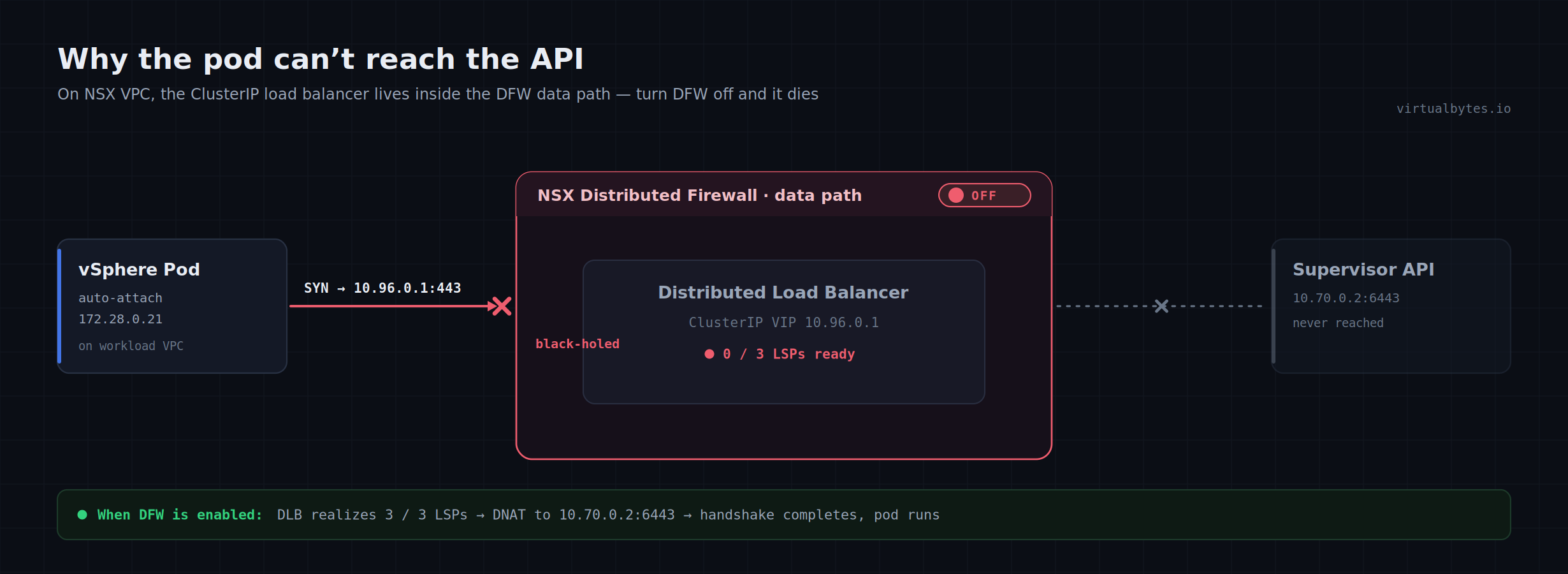
TL;DR: The Distributed Firewall (DFW) was disabled. On NSX VPC, the Distributed Load Balancer that fronts every Kubernetes ClusterIP service lives in the DFW data path — so DFW off means the DLB goes down,
10.96.0.1stops answering, and any vSphere Pod that needs the API server crash-loops. The auto-attach pod was simply the first workload unlucky enough to try.
What the UI shows
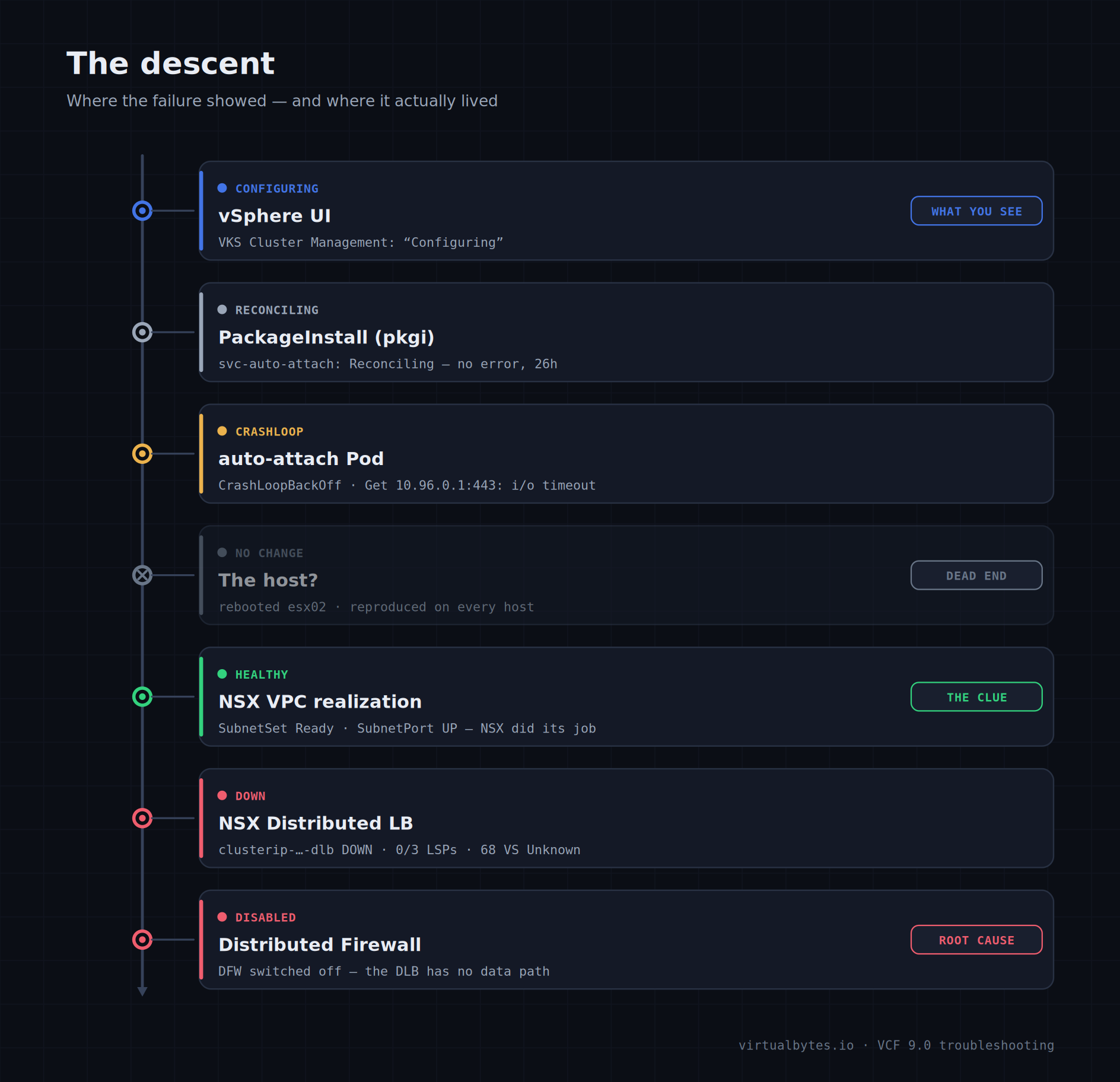
In the Supervisor Services list, two services were happily Configured (Kubernetes Service / svc-tkg, and Velero / svc-velero), while VKS cluster management (svc-auto-attach) was stuck Configuring. The detail pane showed one warning and a single status message: Reason: Reconciling. Message: Reconciling. No error code, no stack, nothing actionable. That non-answer is the first clue: the failure isn’t surfacing at the layer the UI is reading.
The PackageInstall has nothing to tell us
VKS cluster management is delivered as a Carvel package on the Supervisor. So the first stop is the PackageInstall (pkgi):
$ kubectl get pkgi -n vmware-system-supervisor-services

NAME                                PACKAGE VERSION           DESCRIPTION           AGE
kube-state-metrics                  2.14.0-24825200           Reconcile succeeded   77d
svc-auto-attach.vksm.broadcom.com   0.1.0                     Reconciling           24h
svc-tkg.vsphere.vmware.com          3.4.1-embedded+v1.33      Reconcile succeeded   77d
svc-velero.vsphere.vmware.com       1.8.2-embedded+24925800   Reconcile succeeded   77d
Stuck Reconciling at 24h — not ReconcileFailed. A describe on the pkgi was just as quiet: condition Reconciling, no usefulErrorMessage, no Events. When a pkgi has no error, the action is one layer down: the pkgi is a thin wrapper over a kapp-controller App resource, whose deploy phase blocks until the workload it lays down becomes healthy. So the real story is in the pod.
CrashLoopBackOff, and a very specific error
$ kubectl get pods -n svc-auto-attach-domain-c10 -o wide

NAME                          READY   STATUS             RESTARTS   AGE   IP            NODE
auto-attach-cc9b7d9dc-pzf2m   0/1     CrashLoopBackOff   272        24h   172.28.0.20   esx03-m01.prd.virtualbytes.io
272 restarts. The container starts, runs briefly, dies, repeats. The --previous logs name the cause exactly:
$ kubectl logs -n svc-auto-attach-domain-c10 auto-attach-cc9b7d9dc-pzf2m --previous

{"level":"info","msg":"setting up manager"}
{"level":"error","msg":"Failed to get API Group-Resources",
 "error":"Get \"https://10.96.0.1:443/api?timeout=32s\": dial tcp 10.96.0.1:443: i/o timeout"}
{"level":"error","msg":"failed to setup manager", ... "i/o timeout"}
10.96.0.1 is the in-cluster Kubernetes API ClusterIP (kubernetes.default). The controller-runtime manager’s very first act is to hit the API to discover resources — and it times out, then exits 1. The describe confirms Last State: Terminated, Reason: Error, Exit Code: 1 — not OOMKilled, despite a tight 256Mi limit. This isn’t a config problem or a VCF Automation reachability problem. The pod cannot reach its own cluster’s API server over the pod network.
A trap worth naming: image pull ≠ API reachability
It’s tempting to say “but the image pulled fine, so networking works.” On a vSphere Pod the image is pulled host-side by the spherelet on ESXi, over management networking, then handed to the PodVM. A successful pull says nothing about whether the PodVM’s own in-guest path to a ClusterIP works. That path — and only that path — was broken.
“It must be the host” (it wasn’t)
The pod was on esx03. The obvious hypothesis: something wrong with that host. So I deleted the pod to force a reschedule. It landed on esx02 and went 1/1 Running in twelve seconds. Fixed?
No — and this is the trap. Watch it longer and the pod on esx02 cycles Running → CrashLoopBackOff → Running on a roughly 30-second beat. That 30 seconds is the timeout=32s on the API call: the container comes up, blocks in the doomed dial, times out, exits. And because this container has no liveness or readiness probe, Kubernetes marks it 1/1 Ready the instant the process is alive — even though it’s just sitting in a dying timeout. On esx03 the backoff had grown to its 5-minute cap, so I always sampled it mid-backoff (0/1); on esx02 the backoff was still short, so I caught the brief “Running” windows. Same failure, different sampling.
Lesson: when a pod has no probes,
1/1 Runningmeans “the process exists,” not “the process is healthy.” Trust the logs and the restart count, not the READY column. A later host reboot ofesx02confirmed it — identical timeout on a freshly booted host. The host was never the problem.
NSX realization is perfectly healthy
If it reproduces on every host and survives a reboot, the fault is off-box. This Supervisor uses NSX VPC networking, so the next question is whether NSX actually built the namespace network. It did — flawlessly:
$ kubectl get subnetset -n svc-auto-attach-domain-c10
NAME          ACCESSMODE   NETWORKADDRESSES
pod-default   PrivateTGW   172.28.0.16/28        # Status: SubnetSetReady = True

# SubnetPort: AdminState UP, realized IP/MAC binding present.
# nsx-operator reconciles the port cleanly every 30s, zero errors.
So the pod’s L2/L3 attachment is real. What’s broken is purely the forwarding of pod → ClusterIP traffic. Two details point off-box and away from a routing gap: it’s a silent i/o timeout (a black-hole, no answer to the SYN) rather than network is unreachable (a missing route), and the API service itself is plainly healthy — kubectl works and the endpoint resolves to 10.70.0.2:6443. Something is swallowing pod traffic to the ClusterIP VIP. Time to open NSX.
The Distributed Load Balancer is Down
In NSX → Networking → Load Balancing, there it was. The Distributed Load Balancer named clusterip-752133a9-…-dlb was Down, with the error LbServiceStatus is DOWN stamped at exactly 1:00:00 PM. That UUID carries the same cluster ID tagged on the auto-attach SubnetPort — this DLB is the thing that implements ClusterIP services for the Supervisor. Expanding its virtual servers showed all 68 of them (every 10.96.x service — appplatform webhook, CSI, image-registry, tkr-*, the lot) in status Unknown.
This is why everything earlier looked fine and only the pod looked broken. The route to
10.96.0.1exists, but the load balancer behind it is offline, so the SYN gets no answer — exactly ani/o timeout. It reproduced on every host because a distributed LB being down is a control-plane condition, identical everywhere. And the auto-attach pod was the only thing in the whole Supervisor actually trying to reach a ClusterIP from a pod — so it was the only thing crash-looping. The entire ClusterIP plane was down; one workload just happened to shout about it.
Before you reach for a reboot: the Edges were healthy
The instinct here is to reboot the NSX Edge nodes. Don’t — check them first. In System → Fabric → Nodes → Edge Transport Nodes, both nsx-en01 and nsx-en02 showed Configuration State Success, 16 tunnels up each, Node Status Up, and 0 alarms. Rebooting healthy Edges can’t fix a downed DLB and would only risk a wider outage. A DLB down with healthy Edges means the problem is the LB service / its LSPs, not the hardware path.
NSX tells you exactly where to look
The alarm on the DLB is what cracked it. It named the service down and pointed at KB 372180 with a precise recommended action:
The distributed load balancer service ab517533-97ff-4e24-82d6-3b86e4f908eb is down.

Recommended Action:
  On ESXi host node, invoke the NSX CLI command
  `get load-balancer <lb-uuid> status`.
  If 'Conflict LSP' is reported, check whether this LSP is attached
  to another load balancer service.
  If 'Not Ready LSP' is reported, check the status of this LSP via
  `get logical-switch-port status`.
The KB states the cause plainly: there is no ready LSP for the distributed load balancer on all ESXi hosts. And it carries a warning that turned out to be the whole ballgame — disabling DFW, either globally or via the DFW Exclusion List, causes an outage on DLB workloads, because the Distributed Load Balancer runs in the DFW data path. The DLB lives on the hosts, so the status command runs from an ESXi host’s NSX CLI, not the Supervisor control plane:
[root@esx01-m01:~] nsxcli
esx01-m01.prd.virtualbytes.io> get load-balancer ab517533-97ff-4e24-82d6-3b86e4f908eb status

Load Balancer
UUID                : ab517533-97ff-4e24-82d6-3b86e4f908eb
Display-Name        : clusterip-752133a9-...-dlb
Status              : not ready
Ready LSP Count     : 0
Not Ready LSP Count : 3
Conflict LSP Count  : 0
Not Ready LSP       : cc51af7d-051c-431a-8542-4ed0497409f7
                      d92fa7ad-f6cc-465a-a590-9fd8682b3f1f
                      ba46fd66-92ef-4d38-8a44-3ce7e08f87b7
Warning             : DFW is disabled
There it is, in one line: Warning: DFW is disabled. Zero ready LSPs on the host, three not ready, and the firewall that the DLB depends on is switched off. Note the LSPs are Not Ready, not Conflict — consistent with DFW being disabled rather than an LSP collision, so there was no need to chase the get logical-switch-port branch.
dial tcp 10.96.0.1:443: i/o timeout.Re-enable the Distributed Firewall
The fix is exactly what the diagnosis implies: turn DFW back on. In NSX → Security → Distributed Firewall → Settings → General Firewall Settings, the Distributed Firewall Service toggle controls global enforcement. Also check Settings → Exclusion List — excluding the Supervisor (or these workloads) from DFW produces the same “DFW is disabled” result for the DLB’s LSPs without the global switch being off, so verify both.
Mind the blast radius. Re-enabling DFW on a production Supervisor is itself a change with reach. DFW doesn’t disable itself — before flipping it back on, glance at the rule set so you’re not trading one outage for another (an enabled DFW with an empty or wrong default rule is its own hazard), and ideally understand why it was off in the first place. Per KB 372180, no maintenance window is required, and crucially: no reboot is needed — which is the whole point of the Edge/host detours above being dead ends.
The host CLI is the source of truth for whether it worked. Re-run the same command and watch the LSPs recover:
esx01-m01.prd.virtualbytes.io> get load-balancer ab517533-97ff-4e24-82d6-3b86e4f908eb status

Status              : ready
Ready LSP Count     : 3
Not Ready LSP Count : 0
Conflict LSP Count  : 0
Ready LSP           : cc51af7d-...  d92fa7ad-...  ba46fd66-...
# Warning line gone.
From not ready / 0 / 3 with the DFW warning, to ready / 3 / 0 and clean. In the NSX UI the DLB row flips to Success with 0 alarms, and the 68 virtual servers move off Unknown.
Watch the recovery cascade down
The LB coming up doesn’t instantly un-stick the pod — it removes what was blocking it. Force a clean pod start (or wait out the backoff) and confirm each layer recovers in order:
$ kubectl delete -n svc-auto-attach-domain-c10 \
      "$(kubectl get pods -n svc-auto-attach-domain-c10 -o name | head -1)"

$ kubectl get pods -n svc-auto-attach-domain-c10 -o wide
NAME                          READY   STATUS    RESTARTS   AGE   NODE
auto-attach-cc9b7d9dc-d67bn   1/1     Running   6          14m   esx04-m01.prd.virtualbytes.io

# Logs: no more 10.96.0.1 i/o timeout. The controller is doing real work now.

$ kubectl get pkgi -n vmware-system-supervisor-services
NAME                                PACKAGE VERSION   DESCRIPTION
svc-auto-attach.vksm.broadcom.com   0.1.0             Reconcile succeeded
The pod stays up, the restart count freezes, the API timeout is gone, and the pkgi flips to Reconcile succeeded — the line we’d been chasing for 26 hours. That’s the moment VKS cluster management in the vSphere UI moves from Configuring to Configured. Done.
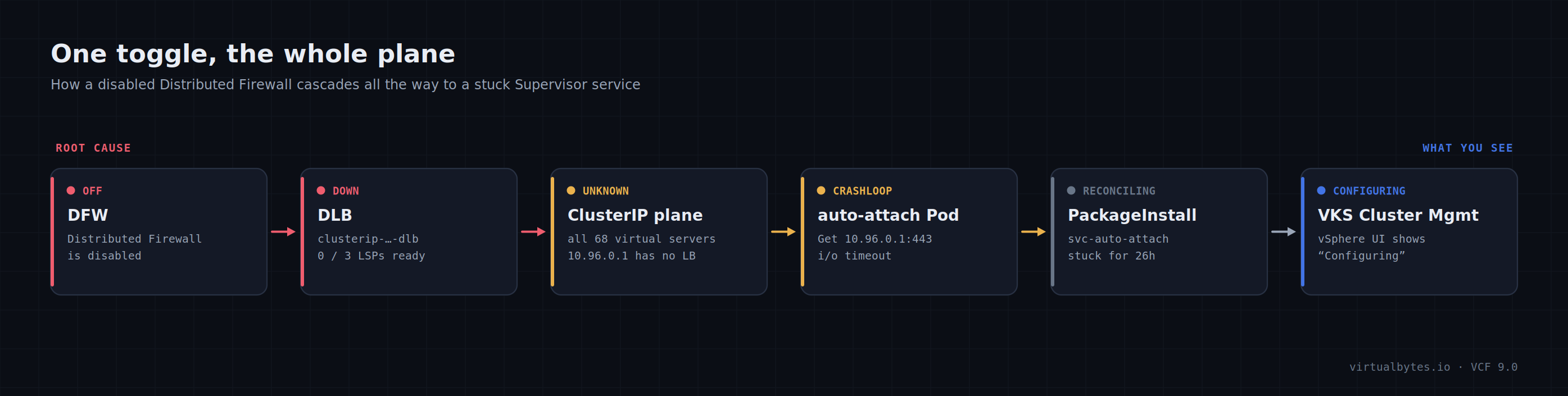
The whole chain, end to end
DFW disabled → the Distributed Load Balancer
clusterip-…-dlbloses all ready LSPs and goes Down → all 68 ClusterIP virtual servers (10.96.x) go Unknown → vSphere Pods can’t reach the API ClusterIP10.96.0.1→ the auto-attach pod crash-loops oni/o timeout→ its PackageInstall sits at Reconciling → VKS cluster management shows Configuring. Re-enabling DFW unwinds every link.
Takeaways
- On NSX VPC, the DLB is DFW. ClusterIP services for the Supervisor are realized by a Distributed Load Balancer that runs in the DFW data path. Turn DFW off — globally or via the Exclusion List — and you take out every ClusterIP in the Supervisor. It’s a latent, cluster-wide outage waiting for the first ClusterIP consumer.
- No probes means READY lies. A
1/1 Runningpod with no liveness/readiness probe can be actively dying. Read the logs and the restart count, not the READY column. - Image pull is not API reachability. On vSphere Pods the image is fetched host-side; it tells you nothing about the PodVM’s path to a ClusterIP.
- Don’t reboot on a hunch. The host reboots and Edge-reboot temptation were all dead ends — the Edges were healthy and the cause was a config toggle. Check health and read the alarm before cycling anything; a downed DLB from disabled DFW is fixed with a toggle, never a reboot.
- Read the alarm. The NSX alarm handed over the exact CLI command and KB. The fastest path from “pod won’t start” to root cause ran straight through the DLB alarm detail — not through more
kubectl.
Loose ends worth chasing
Two things outlive the fix. First, find out why DFW was disabled — it doesn’t turn itself off. Check the NSX audit/event log for who toggled DFW (or edited the Exclusion List) around the time the DLB went down. If it was deliberate, make sure re-enabling it didn’t reintroduce whatever it was disabled for.
Second, once the auto-attach pod is running you may see missing hostname errors from its auto-attach-config / auto-attach-secret reconcilers, plus transient auto-attach context is not ready lines as it initializes against your existing VKS clusters. The “context not ready” noise should taper off on its own. If missing hostname persists, verify the Supervisor Management Proxy is configured with your VCF Automation endpoint (the vksmHTTPRemoteEndpoint host, e.g. vcfa.prd.virtualbytes.io) — that’s a separate, much smaller thread, and it won’t block the pkgi, which is already green.
Tags: VCF 9.0, vSphere Supervisor, VKS, NSX VPC, Distributed Firewall, Distributed Load Balancer, ClusterIP, auto-attach, Troubleshooting