This is a known bug, and service requests are open with the Broadcom Support team. Link to KB there are scripts to help also or can be done manually below.
Validate NSX Install Image is Available                 Validate NSX Install Image is Available

NSX install image validation failed for NSX Version - 9.0.1.0.24952111 Remediation: Please download NSX install image with Version - 9.0.1.0.24952111 Reference Token: J####E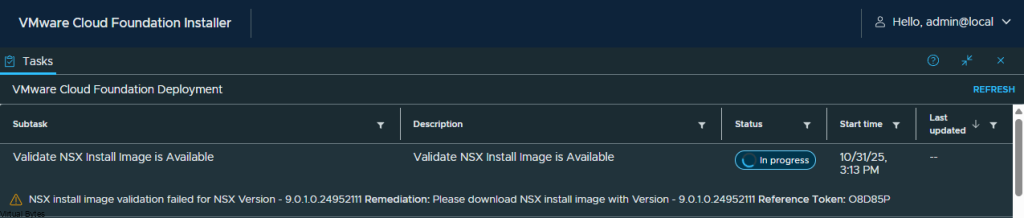
NSX install image validation failed for NSX Version – 9.0.1.0.24952111 Remediation: Please download NSX install image with Version – 9.0.1.0.24952111 Reference Token: O8D85P
- Disconnect your VCF Installer from the online depot, as it automatically updates the manifests every few minutes.
- SSH into SDDC Manager
- Elevate to root su –
- Change Directory to the NFS Mount
cd /nfs/vmware/vcf/nfs-mount/
Change Directory
cd metadata/Take a copy of your vcfManifest.json
cp vcfManifest.json vcfManifest.json-backup
Using the sed command, remove the NSX 9.0.1.0 and metadata dependencies while maintaining the validity of the JSON file.
sed -i -e '1707,2191d' -e '1706s/,$//' vcfManifest.json
Then validate the JSON file with the jq command and your should see the version and squence number appear.
jq . vcfManifest.json| head -n 3
After you have validated the JSON then elevate to root ” su – ” a then execute the postgresql command to delete the manifest from the lcm table.

psql -h localhost -U postgres lcm -c "DELETE FROM manifest;"You will need token to authenticate the session for being able to execute API commands.

TOKEN=$(curl -H 'Content-Type:application/json' https://localhost/v1/tokens -d '{"username":"admin@local","password":"VMware1!VMware1!"}' -k | jq -r '.accessToken')
curl -k -H 'Content-Type: application/json' -H "Authorization: Bearer $TOKEN" -X POST https://localhost/v1/manifests -d "@/nfs/vmware/vcf/nfs-mount/metadata/vcfManifest.json"After updating the vcfManifest.json file, return to the VCF Installer and refresh the page. You should then see the 9.0.0.0 binaries.