Unsupported: Lab only
VMSP Toolkit is an independent project built for lab and proof of concept environments. It is not a Broadcom product and Broadcom does not support it.
The Broadcom resize script is not included. You need to obtain it from Broadcom on your own.
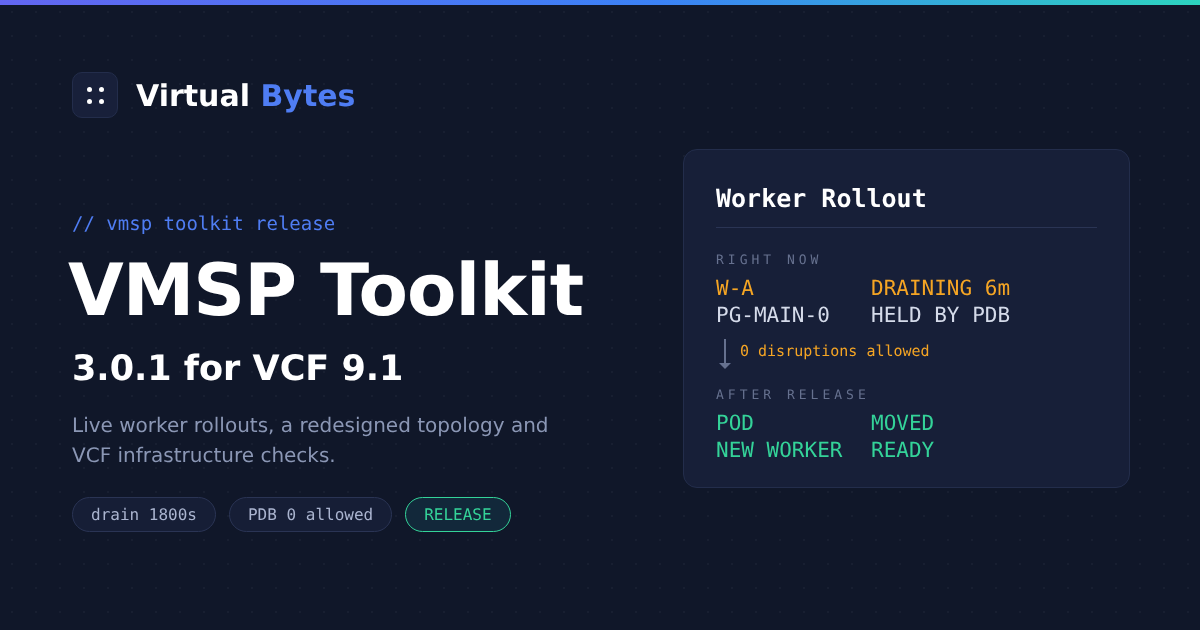
A worker resize on VMSP replaces every worker machine. Each drain along the way can sit for 30 minutes behind a single Postgres pod, and until now the only thing to look at was a package status that reads Progressing from start to finish.
VMSP Toolkit 3.0.1 tells you which pod is holding things up, how long Cluster API will keep waiting, and gives you a clean way to release it.
If you are new to the series: VMSP Toolkit is a Photon OS 5 appliance for VMware Cloud Foundation (VCF) 9.x administrators. It troubleshoots the VCF management services platform (VMSP), which is the Kubernetes runtime behind VCF Operations fleet management and the services around it. It maps services and workloads, evaluates the platform against the DISA Kubernetes STIG using real node evidence, scans the running container images, checks the surrounding VCF infrastructure, follows worker rollouts live and produces a one page posture report. All of it runs on the appliance. The 1.0 post and the 2.0 post have the background.
Watching a worker rollout as it happens
Some context on why a resize is slow. Cluster API adds one new worker and waits for it to be Ready. Then it cordons, drains and deletes one old worker, and does the same again until no old workers are left. The drains block on Zalando Postgres PodDisruptionBudgets (PDBs) that have a single replica and minAvailable: 1. They stay blocked until nodeDrainTimeoutSeconds runs out, which is 1800 seconds on VMSP, and at that point Postgres stops uncleanly along with the VM. I wrote up the mechanics in the rightsizing field notes.
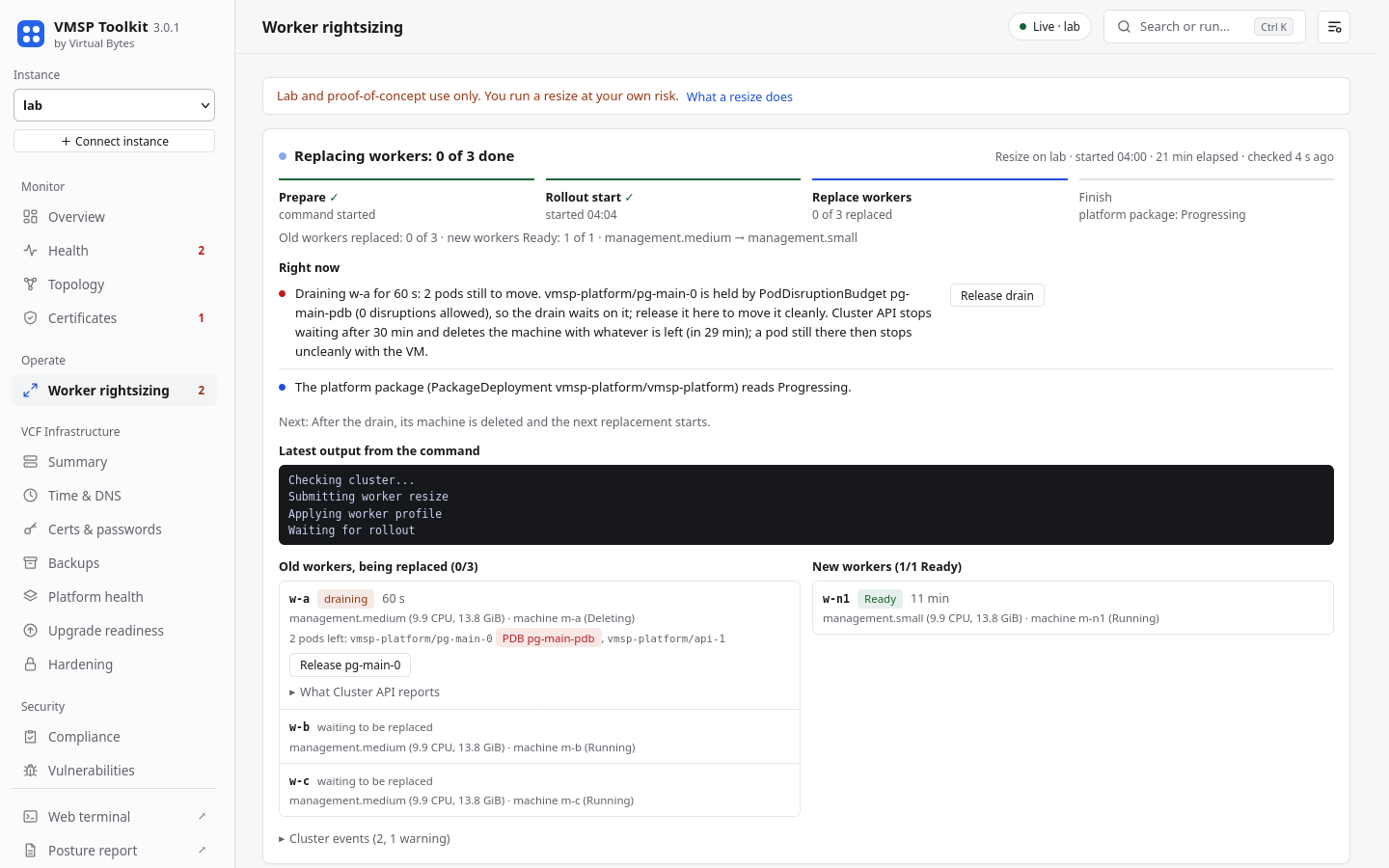
The Worker rightsizing page in 3.0.1 follows a resize using the live Cluster API objects (VMSP 9.1 serves the v1beta2 API). At the top is the stage: Prepare, Rollout start, Replace workers, Finish. It shows elapsed time and when the appliance last checked, and once the first worker has been replaced it adds an ETA.
Below that is a section called Right now, which is written in plain sentences. A typical one reads: “Draining w-a for 6 min: 2 pods still to move. vmsp-platform/pg-main-0 is held by PodDisruptionBudget pg-main-pdb (0 disruptions allowed)”. Next to it you get the time left before Cluster API stops waiting and a Release drain button.
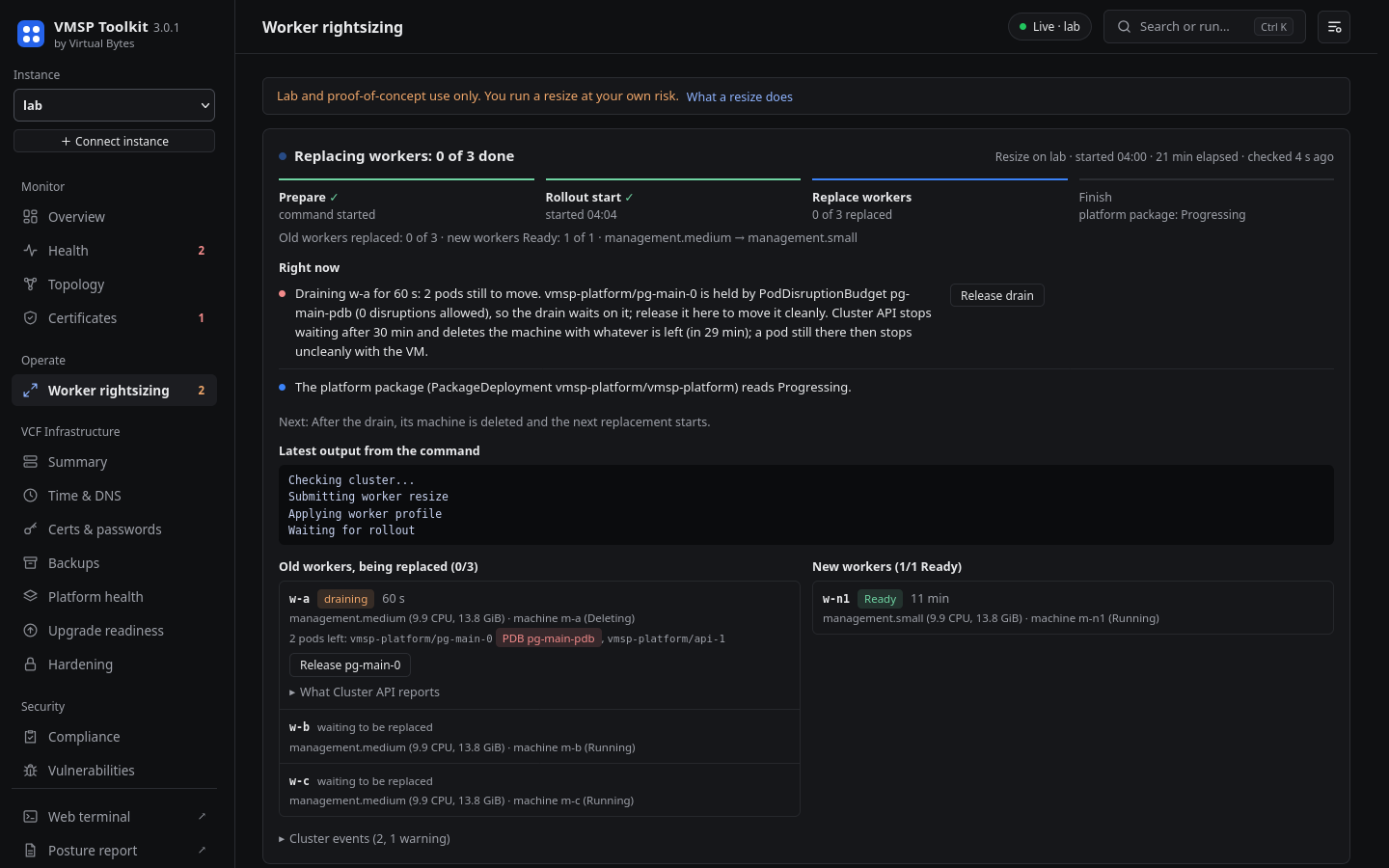
Old and new workers are listed side by side with their profile and size. An old worker is waiting, draining (with the number of pods left and the pod that is pinned), having its VM deleted, or replaced. A new worker is having its VM created, waiting to register, or Ready.
The page also warns you early. It flags old workers that still host a database pinned by a PDB before their turn comes. It shows the platform package whenever it is not Successful, any Cluster API warnings such as a failed machine create, and a new VM that is taking unusually long. If nothing has changed for 10 minutes it says that too.
You can see the command’s latest output and its exit status. Progress shows in the browser tab title, and you get a notice when a drain starts waiting and when the run ends.
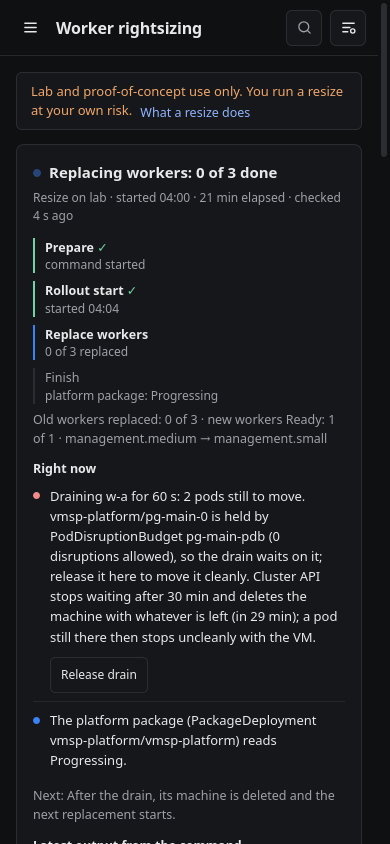
One thing to be clear about: the Broadcom resize script is not included in VMSP Toolkit. The appliance does not ship it and does not download it. If you want to run a worker resize you need to get the script from Broadcom yourself.
Before every resize you have to accept a lab and proof of concept warning. Once ticked, it folds down to a one line “Accepted” banner.
What counts as finished
I wanted the page to be strict about outcomes. If the command fails before it touches anything, the run ends as failed and that is the first thing you read. If the command changes nothing, the page keeps watching for 15 minutes, because the platform applies the change first, and then says “No worker was touched”. A run is only called finished when every node is Ready, nothing is cordoned, every MachineDeployment is up to date, the command has ended and the platform package is Successful.
The “No worker was touched” case is one I hit myself. On my Simple (not HA) VCF 9.1.1 lab a resize ran to completion and the platform accepted the new worker type, but no machine was replaced. On this platform build the target type for a Simple small deployment is the same size as the workers already running, 12 vCPU and 24 GiB. The only thing that really changed was a lower minimum worker count. The page reported exactly that. So a tip: check the size of the target machine type before you plan a maintenance window around a resize.
That also means I should be clear about how far the testing goes. The live view was tested against a scripted VMSP v1beta2 rollout played step by step. I have not yet watched a full replacement rollout through the toolkit on a real cluster. That is still ahead.
Container topology, redesigned
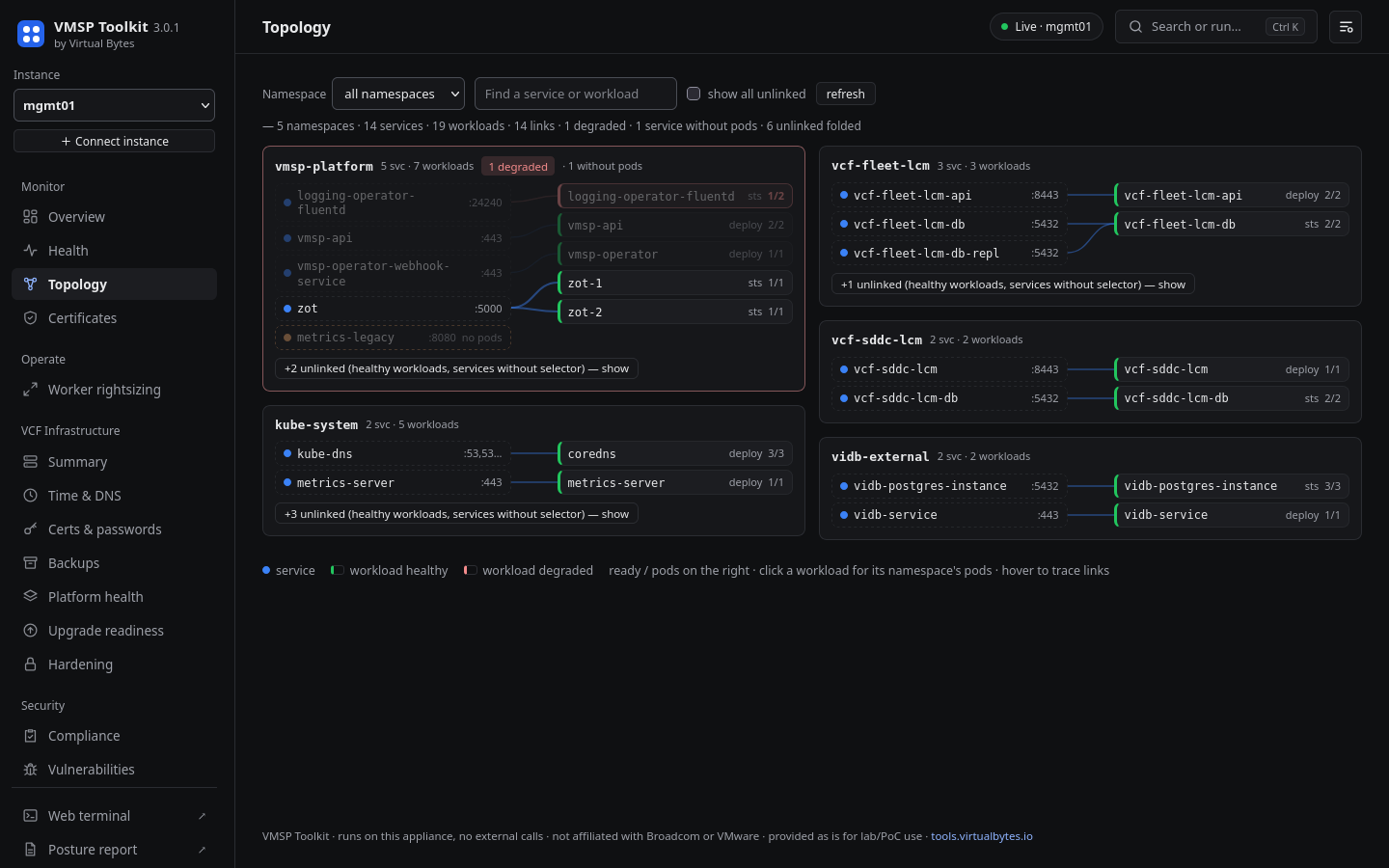
The old topology page was one big canvas. Labels overlapped, switching namespace left a stale, stretched picture behind, and a CronJob drew a box for every run it had ever made. I replaced it.
Each namespace now gets its own card. Services are on the left, the workloads they select are on the right, and lines are drawn between them. The browser lays out the rows, so names can no longer land on top of each other. Long names are cut short and the full name shows on hover.
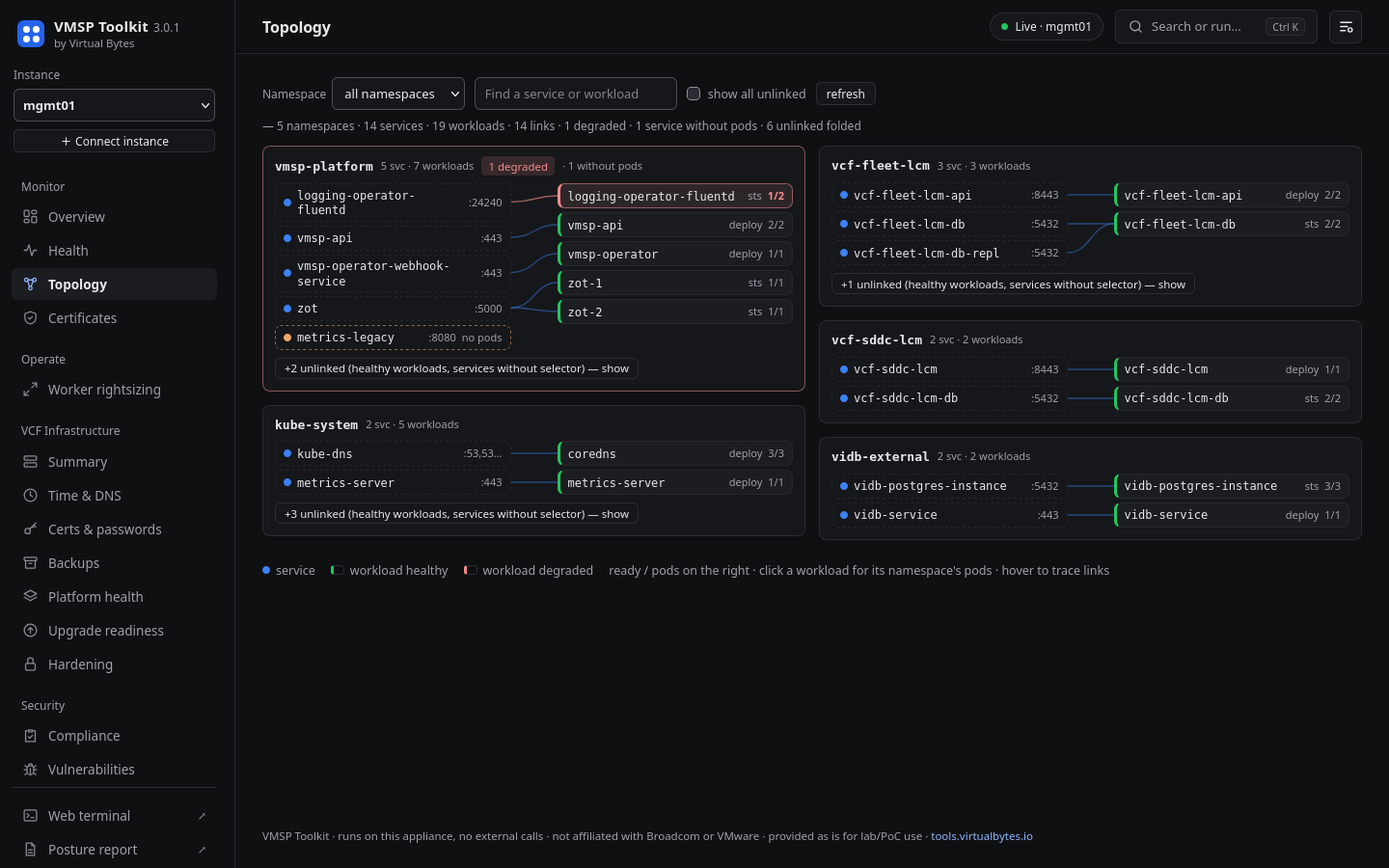
Problems are sorted to the top. A degraded workload is red, and its namespace card moves up with a “1 degraded” marker. A service whose selector matches no pod stays on the card and is marked “no pods”.
Healthy rows with no links fold into a single line per namespace that you can expand, and CronJob runs collapse to one row per CronJob. You can search across every namespace or pick just one.
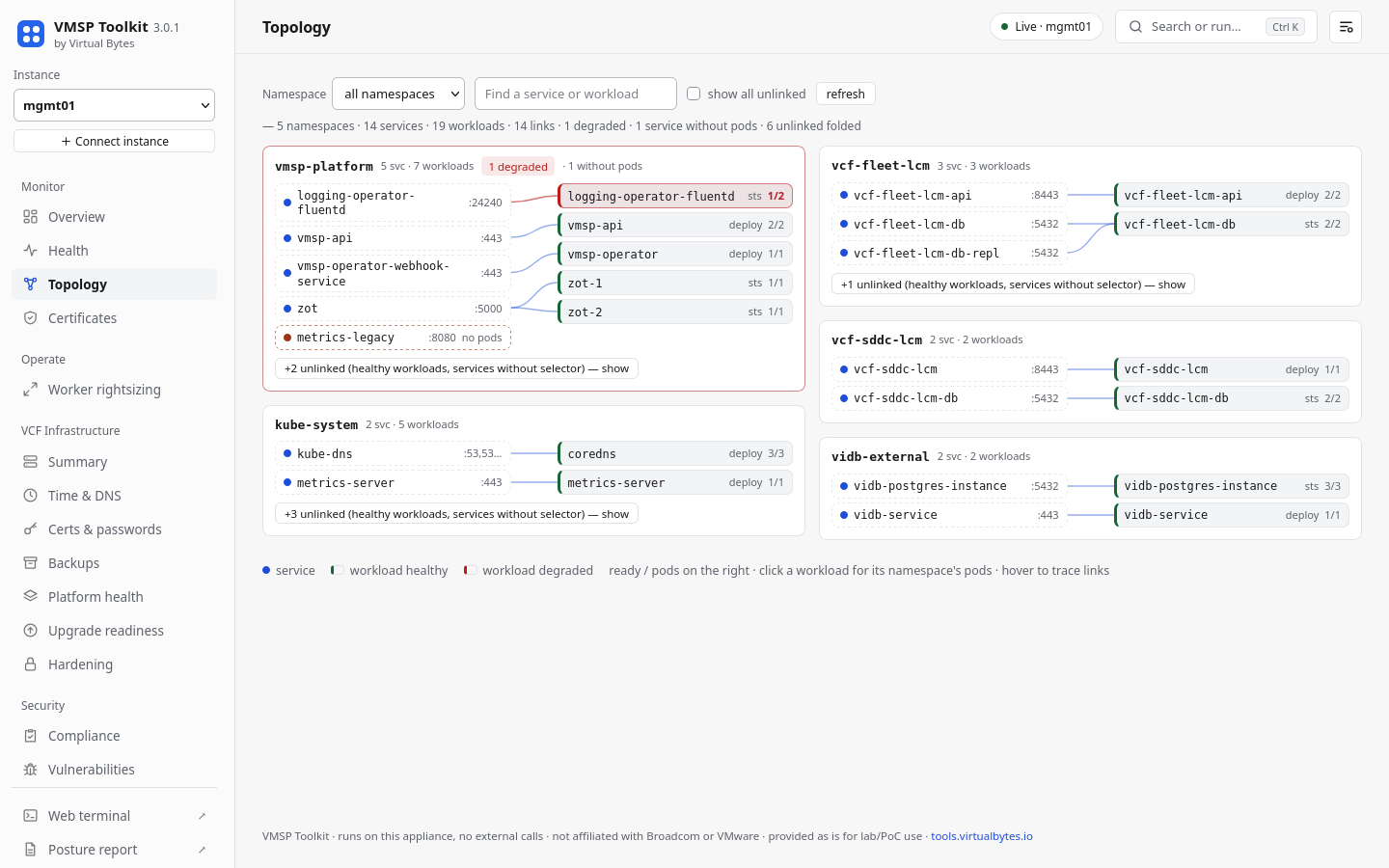
Hovering a service or a workload highlights its links and dims everything else on the card.
Release, rebuilt after a field test
This part of the release exists because of a mistake in my own lab. During the first test on a live VCF 9.1.1 cluster no rollout was running, and I used the old “cordon + move” action in the table of blocked PDBs several times in a row. Every click cordoned a worker and deleted a database pod. After a few clicks every worker was cordoned and the deleted pods had nowhere to start. Uncordoning the workers fixed it, but the action clearly should not have been available in that situation.
So Release now only exists during a real drain. The appliance offers it, and accepts it, only while Cluster API is deleting the machine for that pod’s node and has already cordoned the node. It deletes that one pod. It never cordons anything.
It also refuses when it is not sure. A release is declined if:
- the Cluster API machines cannot be read
- Postgres is in the middle of a critical operation
- the pod’s StatefulSet has another replica down (Zalando’s PDB only counts the primary, so the PDB on its own still says “1/1”)
- a PDB has not caught up yet
- no untainted worker can take the pod
- another release ran under the same PDB in the last 90 seconds
Only one release runs at a time, and the confirm dialog opens with Cancel selected. There is an Uncordon action to undo a cordon made by hand, and it is refused while Cluster API is draining that node. The guidance in the Health check output, the known issue rule and the playbook has been changed to match: do not cordon workers by hand to move a database.
VCF Infrastructure
The 3.0 line looks beyond VMSP for the first time. You connect SDDC Manager once and the appliance discovers the vCenters, NSX managers and ESXi hosts from it. One read only run then fills seven pages: Summary, Time & DNS, Certificates & passwords, Backups, Platform health, Upgrade readiness and Hardening.
Credentials stay in the web service’s memory for at most 4 hours and never touch disk. They are only sent to an endpoint whose TLS certificate matches the one pinned on first contact. Anything the run could not read is reported as unknown, never as healthy.
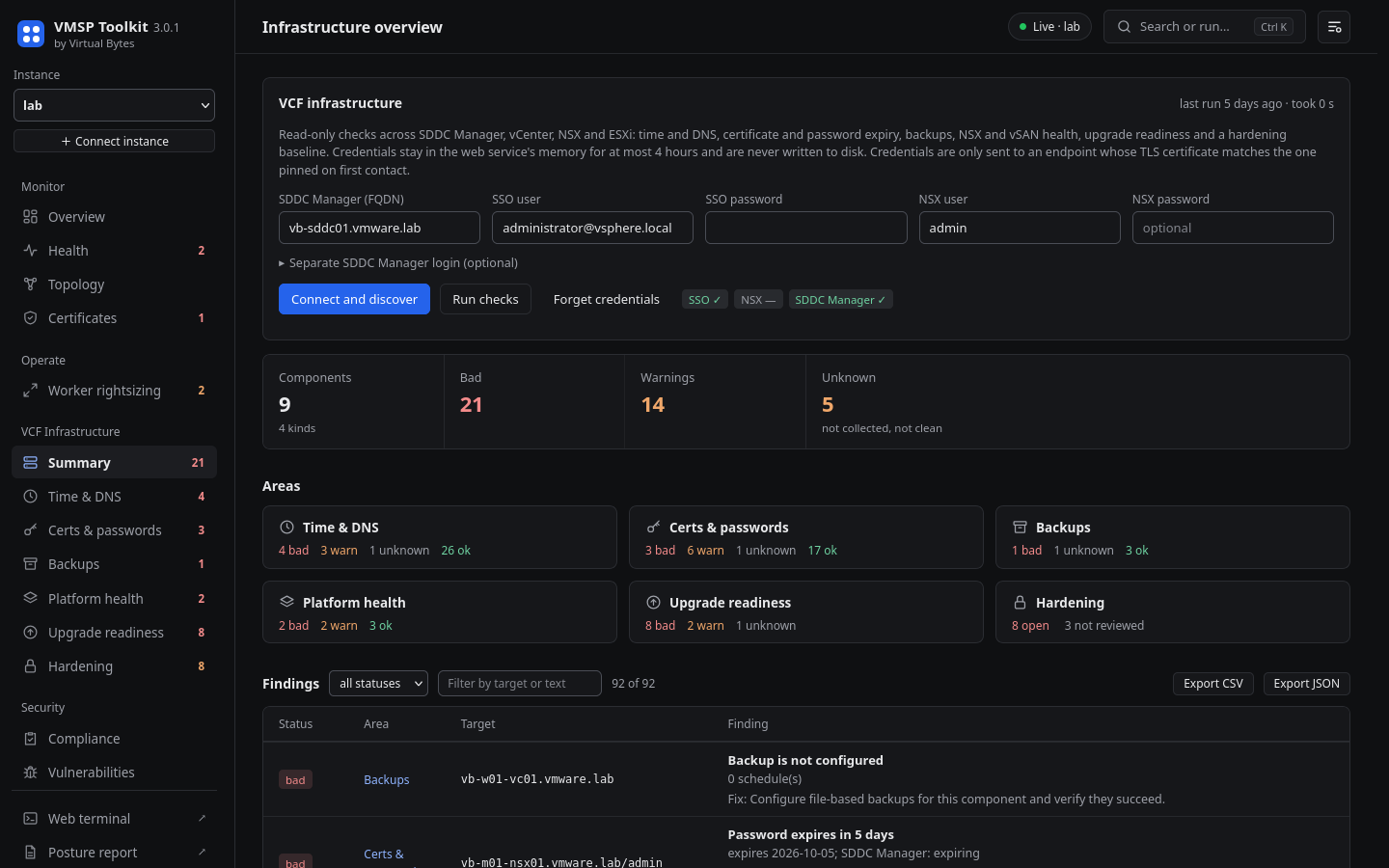
Running this against a live VCF 9.1.1 estate turned up several things that 3.0.1 fixes. Three are worth calling out.
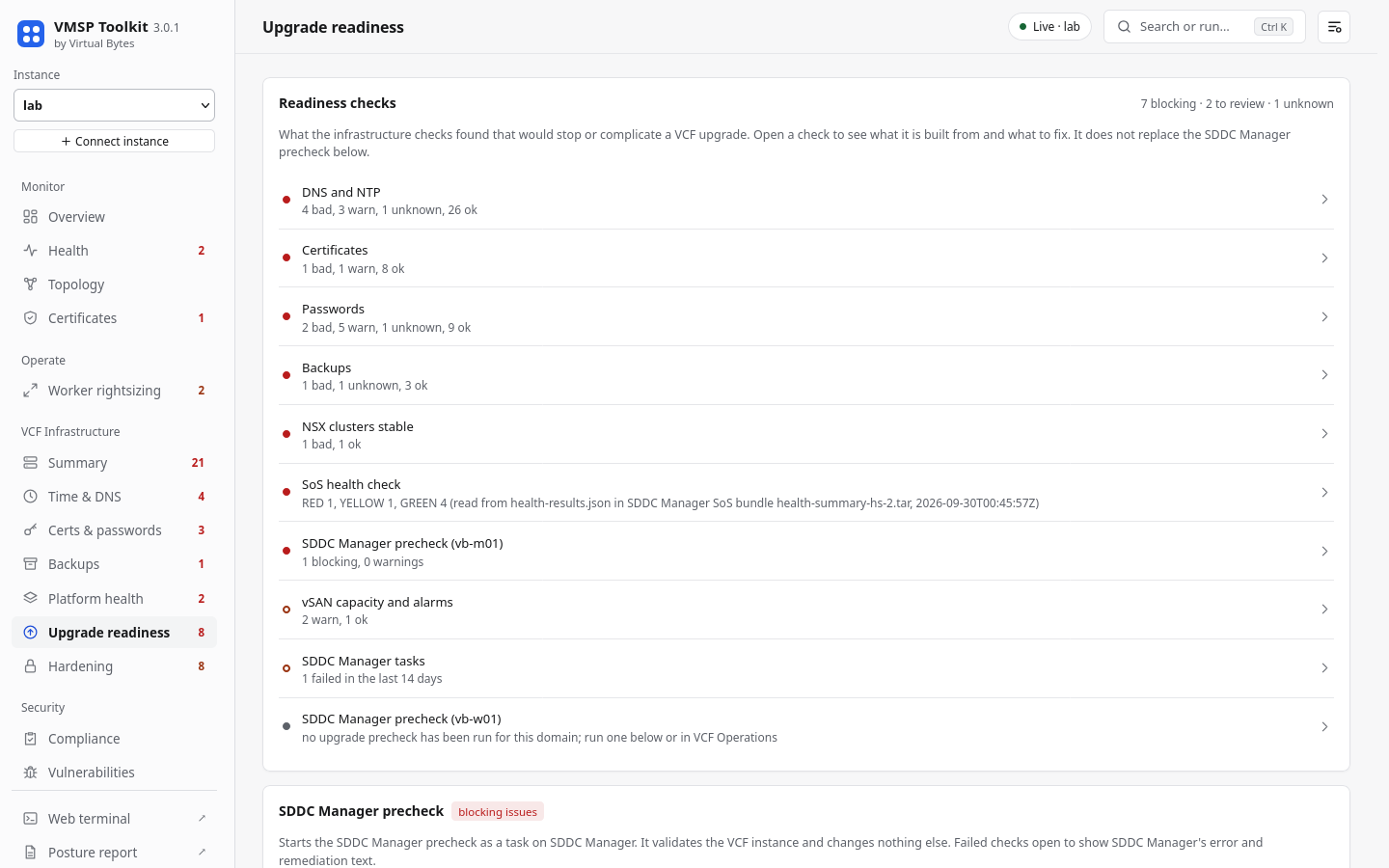
VCF 9 removed the old precheck API. Upgrade readiness now reads the latest check set run for each domain, whoever started it. A run that “completed with success” but still holds critical gaps is treated as blocking. Every readiness check can be opened to see what it is built from.
The “User is not authorized” error on SDDC Manager now has an explanation. In VCF 9, [email protected] has no SDDC Manager role by default (Broadcom KB 439276). The toolkit can tell a wrong password from a missing role and offers a separate SDDC Manager login.
The toolkit will not get your IP locked out. SDDC Manager blocks a client IP for 24 hours after 10 failed logins (Broadcom KB 314640), so the toolkit never retries a login that was rejected and never goes past eight attempts.
Smaller changes
Running tdnf update no longer breaks the web UI. This was issue #1 on the previous repository. The web stack now lives in a directory that does not depend on the Python version, with pinned hashes, and the modules that Photon packages come from tdnf.
The interface has been cleaned up in both the dark and light themes. The palette is neutral, panels are flat, gradients and glows are gone, and labels use sentence case. The status colours still pass a WCAG contrast test in both themes.
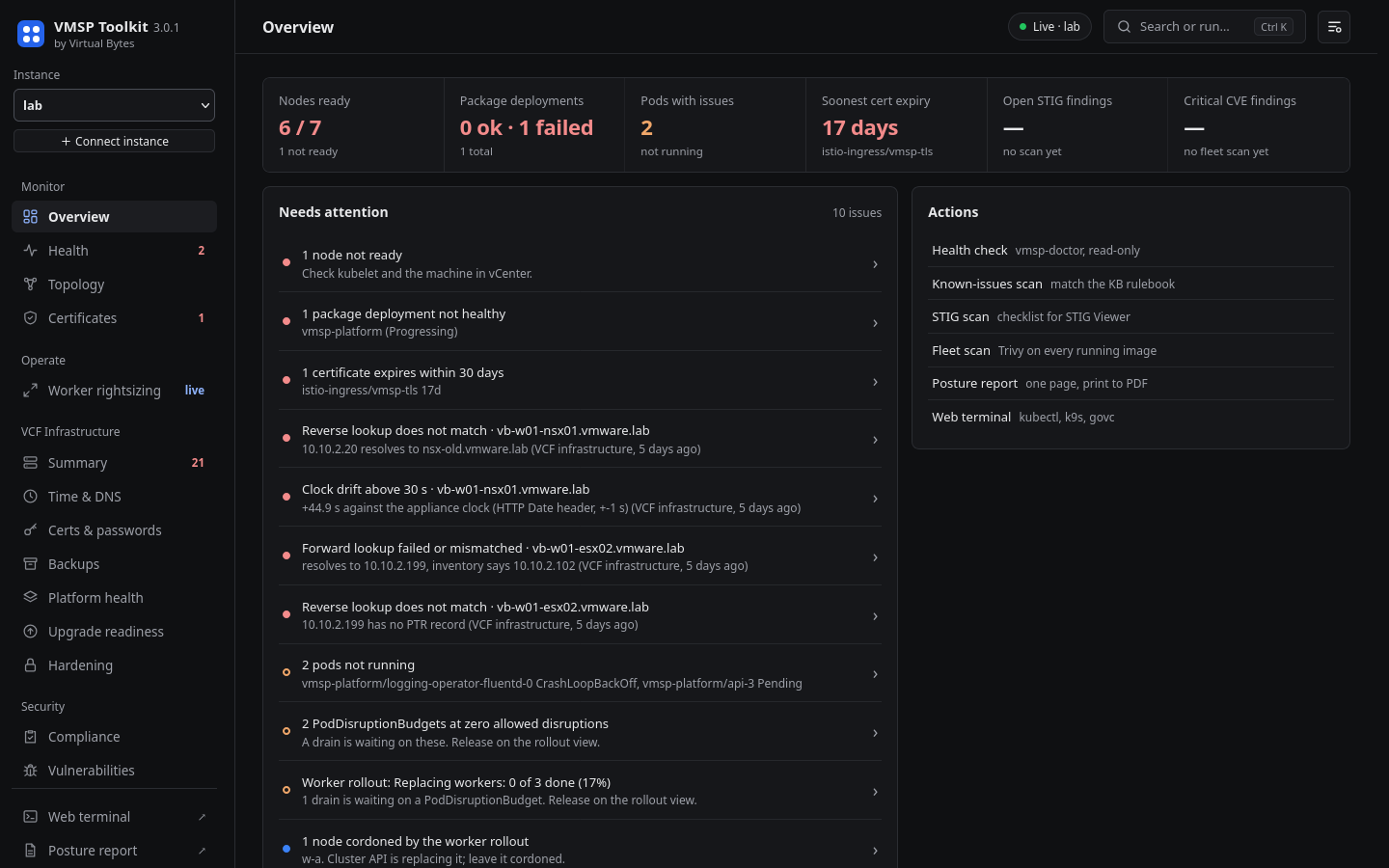
Known issues now show the lines that matched instead of the head of the output. A check that times out reads Unknown, never clear.
What it doesn’t do
- It does not include the Broadcom resize script. You need to get that from Broadcom yourself.
- It never weakens a PodDisruptionBudget and never cordons a node.
- It does not guess. If something cannot be read it is reported as unknown, and a release it has doubts about is refused.
- It makes no outbound calls apart from the vulnerability database fetch that you start yourself. The weekly checks ship disabled.
- Credentials are per session. They are never written to disk and never passed as command arguments.
Get it
Version: 3.0.1
Platform: Photon OS 5 OVA, about 1.1 GB. Needs vSphere 9 (virtual hardware version 22, so ESXi 9.0 or later). Developed against a VCF 9.1.1 lab.
Requirements: 2 vCPU, 4 GB memory, 20 GB disk
Download: https://github.com/virtual-bytes/vmsp-toolkit/releases/tag/v3.0.1
sha256sum -c vmsp-toolkit-3.0.1.ova.sha256c0ab3161a8e857e8a5989cbe4ef59a264a56807e69e97dba22257ed0eef49509 vmsp-toolkit-3.0.1.ovaDeploy it with Deploy OVF Template in vCenter. The wizard asks for a hostname, IP settings or DHCP, a root password and an optional SSH key. Then browse to https://<appliance>:8443 and sign in as root.
VMSP Toolkit is provided as is, without warranty of any kind, and is intended for lab and proof of concept environments. Production use is at the operator’s own risk.
The Broadcom resize script is not included with VMSP Toolkit. Users need to obtain it from Broadcom on their own.
Independent project. Not affiliated with or endorsed by Broadcom, VMware, DISA, or the US Department of Defense. STIG requirement identifiers and guidance derive from the DISA Kubernetes Security Technical Implementation Guide, published at public.cyber.mil.