TL;DR
- Airlock Depot 2.0.0 is out and downloadable. It carries the Broadcom/VMware VCF depot across an air gap: a connected appliance syncs and scans, a dark-site appliance serves SDDC Manager, VCF Operations and VCF Installer.
- One full-depot package moved 526,681,108,716 bytes across 12,957 files, verified independently on the dark side in about 38 minutes and published atomically: 12,957 new, 0 replaced.
- Then the deltas get small. The first one was 9 files and 88 MB.
- Every package carries a signed manifest that doubles as an SBOM: every file, size, SHA-256, scan attestation, signing identity.
- Transfer is one-way. Nothing but a human-typed summary code goes back the other direction, and no telemetry leaves either appliance.
Download
Everything is on the GitHub releases page under tag v2.0.0: github.com/virtual-bytes/airlock-depot/releases. The repository itself holds only the README, the licence and the third-party licence list. The images are release assets.
There are two OVAs, about 1 GB each. The disk bits are identical; the difference is the descriptor.
- airlock-depot-2.0.0.ova is the dual-configuration image. You pick Connected or Disconnected (Dark Site) in the vSphere deployment wizard. This is the one most people want.
- airlock-depot-2.0.0-darksite.ova is a restricted single-configuration descriptor, for when the high-side image is delivered separately and you want the role fixed in the file rather than chosen at deploy time.
Each OVA ships with .sha256 and .sha512 files alongside it. Verify before you deploy:
sha256sum -c airlock-depot-2.0.0.ova.sha256The SHA-256 values, so you can check without trusting the hash file you downloaded next to the image:
airlock-depot-2.0.0.ova
3d2ab2e5c0353a5da27192ac7c3e87622298bc0c69ef8f11a1fe5fb84bc0f4a9

airlock-depot-2.0.0-darksite.ova
884109eb05983292e12ad3313d5b85d91fe0dc7aeac546638c25c9eabc8a0729
MIT licensed and provided as is, with no support or service levels. The full terms are at the bottom of this post, and read them before you deploy.
The problem with offline depots
VCF expects the internet. SDDC Manager, VCF Operations and VCF Installer all want a depot to pull from, and their offline settings accept a host, a port, a username and a password. There is no path field and no file import. So in a real air gap you end up hand-carrying loose files, guessing at directory layouts, and hoping nothing changed in transit. No signature, no manifest, no scan record, nothing to show an assessor.
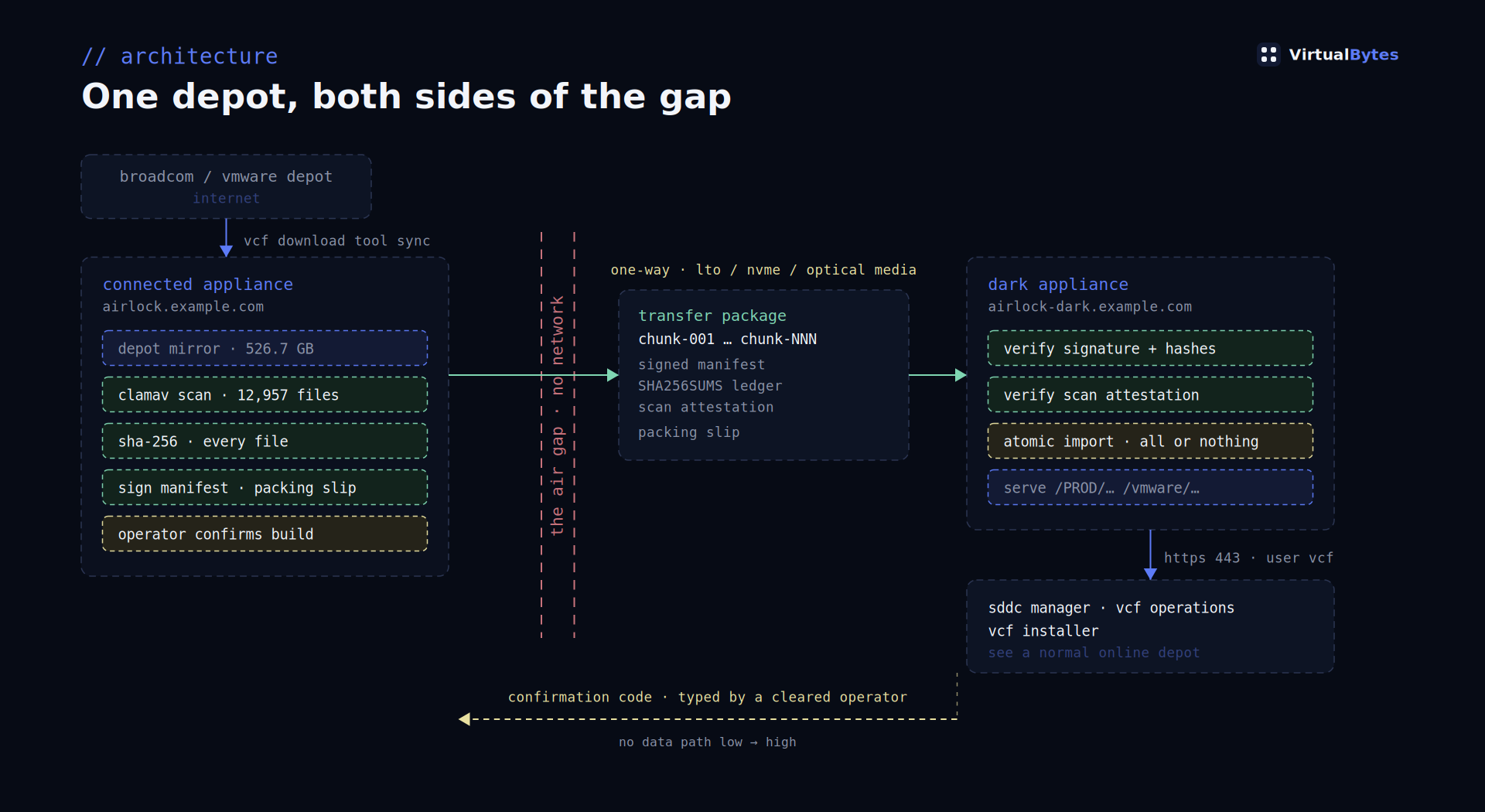
Airlock Depot is two appliances that turn this into a workflow. The connected appliance sits on the internet side, syncs the depot and scans it. The dark-site appliance sits inside the gap, verifies what arrives and serves it. Between them go signed, chunked packages on removable media.
The first crossing is big. The rest are not.
The full depot moved as one package: 526,681,108,716 bytes, 12,957 files, a single NVMe chunk. It was malware-scanned at build time, with the scan attestation embedded in the signed manifest. That embedding matters more than it sounds. An unscanned delta cannot be signed, and there is no override flag to make it happen. The dark side then verified the package independently, taking about 38 minutes, and published it atomically: 12,957 files new, 0 replaced.
After that, the interesting number is the small one. The first delta package was 9 files and 88 MB, riding on that base. It carried the depot metadata, the manifest and product version catalog and compatibility data, which is what lets consumers bootstrap in the first place. Built, verified and published the same day. A real SDDC Manager then connected to the dark depot over HTTPS with basic auth and pulled that metadata: 200, 214,215 bytes for vcfManifest.json. That is the whole point of the exercise, and it is a fairly boring log line, which is how you want it.
An air gap you can audit
The signed manifest is the part your assessors will care about. It lists every file with its size and SHA-256, the scan attestation, the ed25519 signing identity, and the totals. It is an SBOM in the sense that matters here: a complete, signed statement of what is in this package. It is persisted with every export and every import, and it is one click in the GUI to view or download, including from the operator confirmation dialog, where the question is literally “what left this node.”
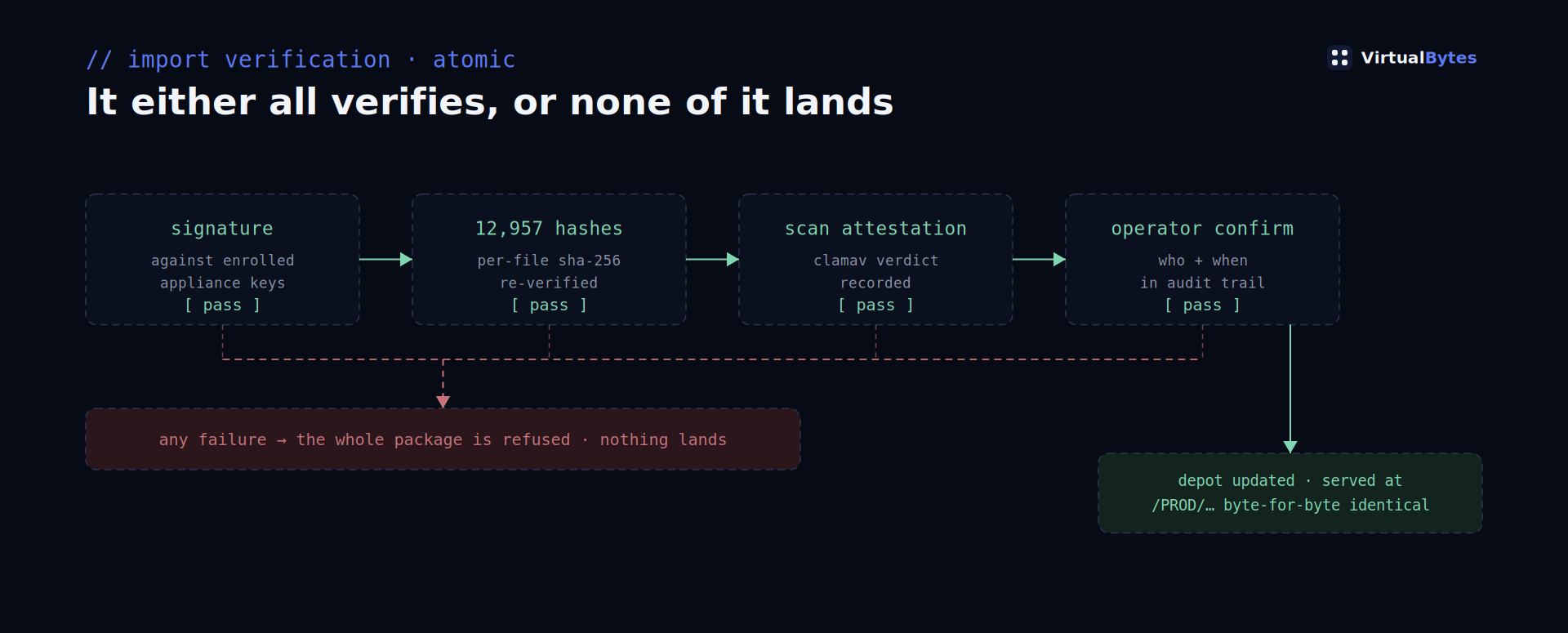
Verification on the dark side is all or nothing. Signature, every file hash, scan attestation. If any of it fails, the whole package is refused. There is no partial import and no unverified file quietly landing in the depot.
The other direction is covered too. Observed consumers shows every client actually pulling from the depot, per IP and user, with first and last seen, bytes transferred, and a health read: serving, some 404s, or denied. There is no manual registry to maintain. It comes straight from the depot access log, so it reflects what is really happening instead of what someone remembered to register. A Consumer tools card sits alongside it with a self-probe and per-product trust scripts to download.
Built for classified networks
A few things exist specifically because of where this runs.
The transfer is one-way. Packages go high side only. The confirmation that closes the loop on the connected appliance is a summary code read off the dark appliance and typed in by a cleared operator. There is no low-to-high data path to argue about, because there is no data path at all.
Classification banners, unset until you set them. A fresh appliance comes up showing a grey band reading SAMPLE, CLASSIFICATION NOT SET, and asks for a one-time acknowledgment after the first sign-in. That acknowledgment is stamped server-side with who and when, and audited. The levels that ship are deliberately a sample set, there to be aligned with your local marking guide rather than assumed correct. Bands follow the familiar green, red, yellow and purple convention, and the colour table is one line of code, so a site whose guide differs can match it exactly. The DoD standard differs from the convention, which is precisely why the shipped set is marked as a sample.
Real media profiles. Chunking is keyed to actual capacities, from LTO-9 at 18 TB down through removable NVMe, BDXL, Blu-ray and DVD5. Write-once media is flagged as such, because a package that assumes it can rewrite a disc is a package that fails at 3 a.m.
No telemetry. Nothing leaves either appliance. Not usage data, not crash reports, not a licence check.
Getting SDDC Manager to trust the depot
This one cost us a day and is worth passing on. The trust script imports the depot certificate into both the commonsvcs trust store and the JRE cacerts. VCF 9 LCM validates against cacerts, so importing into commonsvcs alone leaves you with trust that looks complete in every place you would think to check, while LCM keeps rejecting the depot. We found it against a real SDDC Manager and fixed it there.
Two caveats worth stating plainly. The vcf-operations and vcf-installer scripts are currently placeholders that hand you the certificate and the pointing instructions, pending live verification of their trust-store locations. And the script is not yet idempotent across a depot certificate reissue: delete the airlock-depot alias on the consumer before re-running it. That fix lands in 2.1.
Deploying it
Deploy the OVA into vCenter the usual way. If you took the dual-configuration image, the wizard asks which role this appliance is: Connected for the internet side, Disconnected for inside the gap. Fill in the vApp properties, power it on, and the first-boot Express Setup takes it from there, including pre-flight network checks that tell you specifically which thing is broken rather than just reporting that setup failed.
Storage reclaim knows which package copies the appliance still needs, the ones awaiting confirmation or pending publish, and which it does not. It deletes only the latter, and it never touches removable media. That is a deliberate boundary: the appliance manages its own disk, and your media stays yours.
Why 2.0.0
There was never a 1.x. The development line ran through 1.x and this is the first release anyone outside can install, so it starts at 2.0.0.
License and terms
Airlock Depot is MIT licensed. The appliance bundles third-party components under their own licenses, inventoried in THIRD-PARTY-LICENSES.md in the repository.
Airlock Depot is provided by Virtual Bytes AS IS, without warranty of any kind, express or implied. No support, maintenance, updates, or service levels are offered or implied. Use at your own risk. Virtual Bytes accepts no liability for any damages arising from its use. This is a community tool, not a Virtual Bytes product offering; see the LICENSE file for the full terms.
The same wording is baked into the OVF, so it appears in the vCenter deployment wizard and in the VM notes.
Airlock Depot 2.0.0 works with VMware Cloud Foundation 9.1 and serves SDDC Manager, VCF Operations and VCF Installer as ordinary depot consumers. Download it here, and more at tools.virtualbytes.io.