

This one started as a five minute question and turned into a full day. If you are planning a VCF 9.0.2 to 9.1 upgrade, the error below may be waiting for you, and almost every instinct you have about what it means will be wrong.
Saving domain target version failed. Validation failures occurred while trying to save target version
Reference token: 9PJRQR : Cannot upgrade to VCF version 9.1.0.0 for domain [domain-id] in a compatible way:
not upgradable: ; not interoperable: NSX_T_MANAGER 9.1.0.0200.25524170 -> ESX_HOST 9.0.2.0.25148076,
NSX_T_MANAGER 9.1.0.0200.25524170 -> VCENTER 9.0.2.0.25148086.
It names three components and reads like a missing bundle or a broken upgrade sequence. It is neither. I chased both of those theories and both were dead ends. What it actually turned out to be is more interesting, and the path to proving it runs entirely through the LCM debug log.
The Short Version
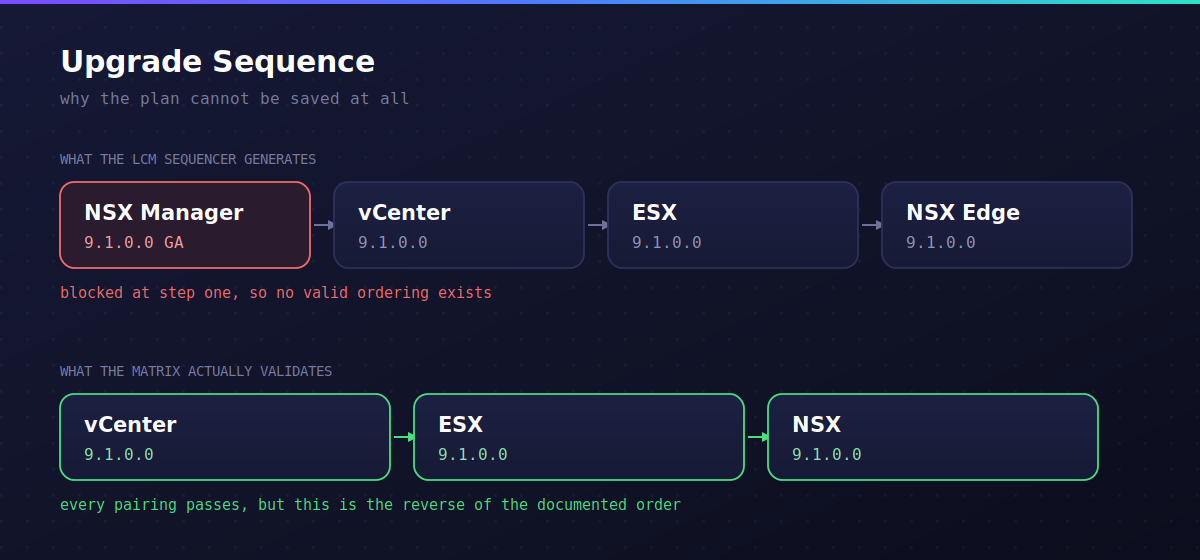
The VCF compatibility matrix contains an affirmative entry stating that NSX 9.1 is not interoperable with vCenter 9.0.2 and ESX 9.0.2. Not missing data. Not stale metadata. An actual recorded incompatibility. Because the LCM sequencer insists on upgrading NSX Manager first, every possible ordering it can generate passes through that blocked state, so it refuses to save any 9.1 target version at all.
Selecting the GA build instead of a patch build does not help. The block applies to both. There is a Broadcom KB that disables the compatibility checks, but it is written for VCF 5.x, one of its two properties does not exist in 9.x, and it carries a warning that names this exact symptom. More on all of that below.
Finding The LCM Log In 9.x
Older habits fail here. There is no lcm.log anymore:
tail -f /var/log/vmware/vcf/lcm/lcm.log
tail: cannot open '/var/log/vmware/vcf/lcm/lcm.log' for reading: No such file or directory
The active file is lcm-debug.log. Rotated copies are named lcm.<date>.<n>.log-debug.gz, so anything older than today needs zgrep. Start with the reference token from the UI, which appears verbatim:
cd /var/log/vmware/vcf/lcm
zgrep -i -E '9PJRQR|NI88PH' lcm-debug.log lcm.out lcm.err lcm.*.log-debug.gz
That gets you to the exception, but the exception is only a Spring stack trace out of DomainVersionServiceImpl.saveDomainVersion and tells you nothing. The useful output is upstream. Tail the log while you retry the save:
tail -f lcm-debug.log | grep -i -E 'interoperab|not upgradable|targetVersion|BundleCompat'First Wrong Theory: The Depot
My first read was that only NSX had a 9.1 bundle downloaded, so LCM was planning NSX forward while vCenter and ESX stayed put. That theory died immediately once the plan showed up in the log:
targetVersion: 9.1.0.0   isCustomizedBom: true
  SDDC_MANAGER_VCF  9.1.0.0400.25570100
  VCENTER           9.1.0.0300.25629530
  ESX_HOST          9.1.0.0200.25557999
  NSX_T_MANAGER     9.1.0.0200.25524170
All four components had 9.1 targets. Nothing was missing. Worth knowing: CompatibilityControllerAggregator logs every candidate build it considered per component, which tells you exactly what you are allowed to pick without going back to the UI.
NSX_T_MANAGER candidates:
  9.1.0.0.25318225
  9.1.0.0100.25470810
  9.1.0.0200.25524170
Second Wrong Theory: The Patch Builds
Every component in that plan is at a different patch level. Those 0200 and 0300 suffixes are async patch builds, and the log confirms it:
CustomizeBundlesForTargetProductUtil: Found customized target versions for [ESX_HOST, VCENTER]
CustomizeBundlesForTargetProductUtil: Async patch bundle found matching custom target for VCENTER
UpgradablesServiceImpl: Updating the upgradables list to remove incompatible Async Patches
Patch releases are published per component and are not cross certified against the previous release BOM. So the theory was that a patch build simply had no interop entry for the transitional state, and picking GA would fix it.
It did not. Selecting NSX GA 9.1.0.0.25318225 produced the identical failure:
not interoperable: NSX_T_MANAGER 9.1.0.0.25318225 -> ESX_HOST 9.0.2.0.25148076,
NSX_T_MANAGER 9.1.0.0.25318225 -> VCENTER 9.0.2.0.25148086.
That is the build the documented NSX first sequence is supposed to use. If GA is blocked, the problem is not your build selection. Nothing in that dropdown will validate.
The Line That Actually Explains It
Every compatibility evaluation logs this, which looks damning:
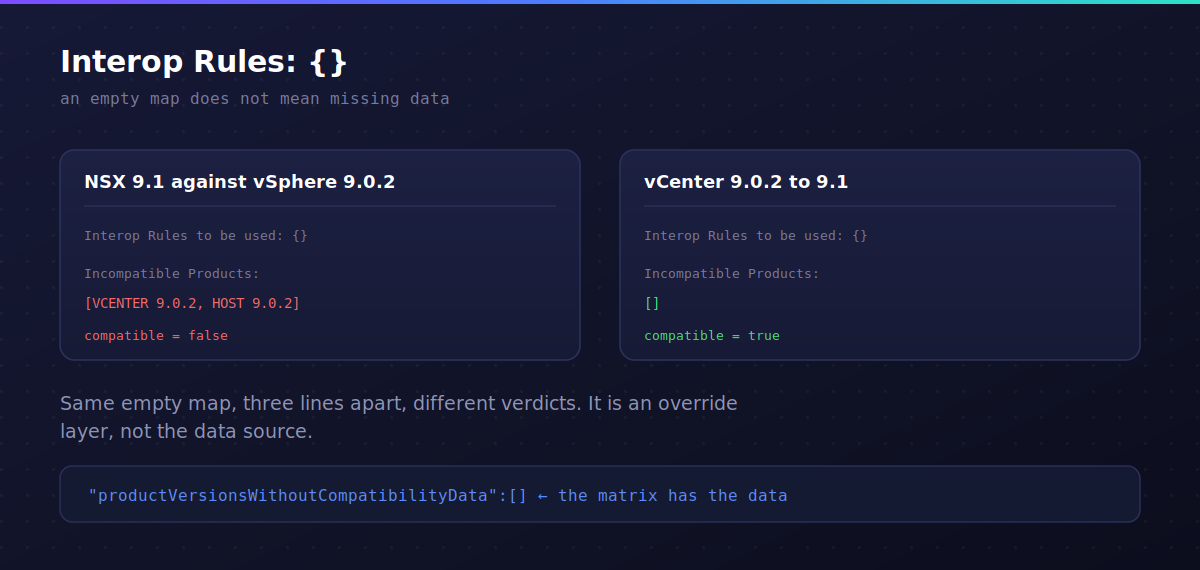
CompatibilityControllerAggregator Interop Rules to be used to determine interoperability: {}An empty rules map. I assumed this meant missing or unsynced compatibility metadata, which on an isolated content gateway is entirely plausible. That assumption was also wrong, and here is the proof. Two evaluations, three lines apart, same empty map, different verdicts:
Interop Rules to be used to determine interoperability: {}
Incompatible Products after applying the interop rules: [VCENTER 9.0.2.0.25148086, HOST 9.0.2.0.25148076]

Interop Rules to be used to determine interoperability: {}
Incompatible Products after applying the interop rules: []
If the map were the data source, both would return the same answer. It is an override layer, and it is empty by default. The real matrix sits underneath it and is producing verdicts normally.
The confirming detail is on every single evaluation:
"productVersionsWithoutCompatibilityData":[]Empty. The system explicitly has compatibility data for these version pairs. It is not guessing and it is not falling back to a default deny. It looked up NSX 9.1 against vSphere 9.0.2 and found a recorded incompatibility.
What The Matrix Does Allow
Every other pairing in the same log run passes cleanly, and reading them together tells you what path the matrix considers valid:
NSX 9.0.2 -> 9.1 GA (upgrade path exists)                   compatible=true
VCENTER 9.0.2 -> 9.1 GA against NSX 9.0.2 and ESX 9.0.2      compatible=true
ESX 9.0.2 -> 9.1 GA against NSX 9.0.2 and VCENTER 9.1        compatible=true
NSX_T_DATAPLANE -> 9.1 against VCENTER 9.1 and ESX 9.1       compatible=true
The sequence that validates end to end is vCenter, then ESX, then NSX. That is the reverse of what the LCM sequencer generates and the reverse of the documented 9.1 order. The sequencer puts NSX first, hits the blocked pairing on step one, and gives up.
There is one more line worth flagging, which suggests something more specific than a generic ordering problem:
Is version in bom achieved for bom version: 9.1.0.0.25318225
  and required version: 9.0.2.0.25150386 = false
That has the same shape as the back in time restrictions Broadcom has documented elsewhere, where a specific source build is not permitted to jump directly to a specific target build. Whether that is the mechanism here is a question for support, not something you can settle from the log.
Upgradeable And Interoperable Are Different Problems
This distinction redirects your entire troubleshooting effort, and the UI error hides it:
- upgradeable=false means the component cannot make that version jump at all. You have a component problem.
- interoperable=false means the jump is fine but the resulting combination is not certified. You have a sequencing state problem.
Throughout this entire episode, upgradeable=true appeared on every bundle. Nothing was ever blocked from upgrading. The UI even tells you so if you read closely: not upgradable: is followed by nothing at all. That empty list is the clue, and it is very easy to skim past.
The Bypass, And The Property That Does Not Exist
Broadcom KB 323368 describes disabling the upgrade compatibility checks. Read it carefully before using it, because there are three things about it that matter.
It is written for VCF 5.x. The stated environment is VCF 5.x and VCF on VxRail 5.x.
Its described cause is the opposite of this problem. Every error string it lists is about missing or malformed data: PRODUCT_VERSIONS_MISSING_FROM_COMPATIBILITY_DATA, offlineCacheData is null, failures loading the offline cache. This case had productVersionsWithoutCompatibilityData: [] on every evaluation. The KB is for when the check cannot compute an answer. Here it computed one.
It carries a warning naming this symptom. The article says the workaround must not be applied for upgrades that warn of NSX incompatibility, and points at another KB for details.
The workaround itself asks you to flip two properties. On 9.x, only one of them exists. Check before you edit:
grep -n compatibilityCheckEnabled /opt/vmware/vcf/lcm/lcm-app/conf/compatibility.flag
grep -n vvs.compatibility /opt/vmware/vcf/lcm/lcm-app/conf/application-prod.properties
The first returns what you expect. The second returns this:
279:lcm.enable.vvs.compatibility.upgrade.alb.precheck=trueNote the alb. The KB asks for lcm.enable.vvs.compatibility.upgrade.precheck, without it. Different property. It does not exist in this file. A sed against the KB string matches nothing and silently succeeds, so unless you diff afterwards you will believe you applied the full workaround when you applied half of it.
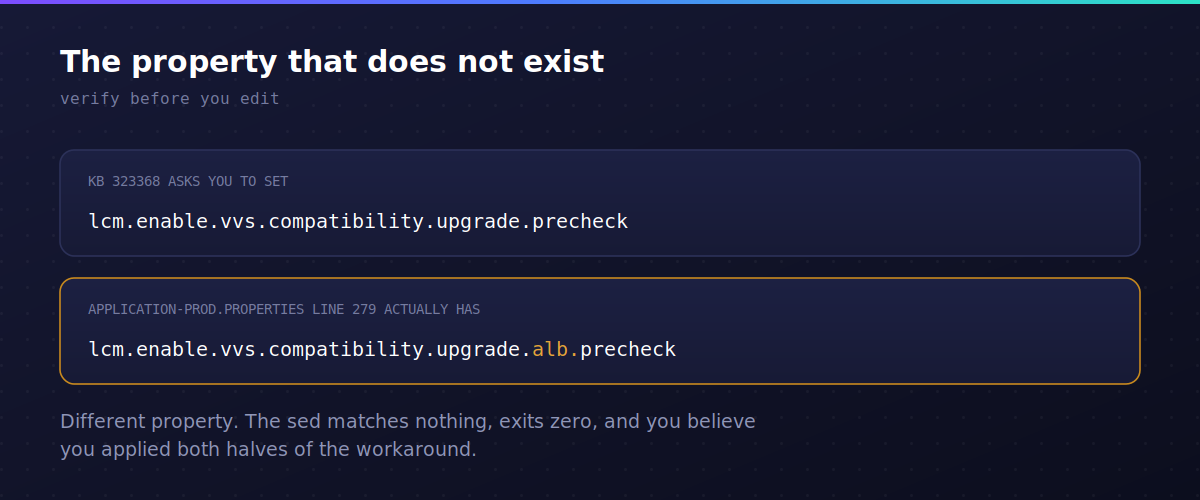
Do not flip the alb property because it looks close. It governs the Avi load balancer precheck and is unrelated.
Always back up first and always verify what changed:
cp /opt/vmware/vcf/lcm/lcm-app/conf/compatibility.flag{,.bak}
cp /opt/vmware/vcf/lcm/lcm-app/conf/application-prod.properties{,.bak}
# make the edit, then
diff /opt/vmware/vcf/lcm/lcm-app/conf/compatibility.flag{.bak,}
systemctl restart lcm
In this environment, flipping the single property that does exist was enough to let the release view save and the plan proceed.
I want to be straightforward about this: that was done against the KB’s own warning, without a support answer in hand, on a management domain. It worked. It was not the careful choice, and if you are reading this to decide what to do in your own environment, the careful choice is to get Broadcom to tell you whether the blocked pairing is intentional and what the supported path is.
Sidebar: Removing NSX From The Plan Corrupts The Release View
An obvious workaround is to drop NSX from the plan so the rest can proceed. It appears to work. It also rewrites the release view in a way that looks alarming:
Domain upgrade version for domain: [domain-id] is 9.0.2.0
  [TargetProductVersion(productType=ESX_HOST, version=9.1.0.0200.25557999),
   TargetProductVersion(productType=VCENTER, version=9.1.0.0300.25629530)]
The release target reverts to 9.0.2.0 with two orphaned 9.1 product targets attached to it. In the UI this shows up as SDDC Manager appearing to target a version below its current one, which looks like a downgrade but is really the 9.0.2.0 BOM’s SDDC Manager build being displayed against a release the domain no longer intends to reach. The log makes the absurdity plain:
Get required VMWARE_SOFTWARE type bundles for skip upgrade
  from {"version":"9.0.2.0"} to {"version":"9.0.2.0"}
Removing a component does not remove one line from the plan. It rewrites the whole thing.
Sidebar: RDU Switchover Can Stall For A Very Long Time
The reduced downtime migration path deploys a new appliance and hands the identity over at switchover. In this environment that stage sat at INPROGRESS for roughly 19 hours. SDDC Manager itself was healthy the whole time, polling every 60 seconds and reporting nothing useful:
VCenterRDUUpgrader Subtask poll interval is 60000 ms
Upgrade element VCENTER_SWITCHOVER status : INPROGRESS
Two things worth knowing. The upgrade logs live on the new appliance, not the source, so UpgradeRunner.log and vcsa_upgrade.log will not exist where you first look. And the source appliance stays fully operational until switchover completes, so a stalled switchover is not automatically an outage. Checking service-control --status --all on the source is the fastest way to establish how much time you actually have.
Cancelling the switchover backed out cleanly and left both the source vCenter and NSX untouched, with NSX reporting overallUpgradeStatus: NOT_STARTED and all transport nodes UP.
Sidebar: General System Error Reported By Backup Server
Worth knowing because it blocks the one thing you want before any of this: a file based backup.
That message is generic and covers almost every remote side failure. In this case it was the SFTP host key never having been accepted. Interactive SSH prompts you to trust the key. The backup service cannot prompt, so it fails the connection and reports the only string it has. Testing by hand from the appliance surfaces it immediately:
sftp -P 22 [email protected]Accepting the key fixed the connection, at which point the next failure appeared: Failed to create backup directory on backup server. That one was ownership. The backup root was owned by root with rwxr-xr-x while the subdirectories were owned by the service account UID with rwxr-x---, so the account could traverse but could not create the nested path the backup wanted. Verify the account actually owns the tree it needs to write into, and remember that permission to write files and permission to mkdir are separate concerns.
Sidebar: Edge Upgrade Fails To Download The Nub
The NSX Edge stage produced this:
Edge/nub/VMware-NSX-edge-9.1.0.0200.25524173.nub failed on edge [edge-node-id]:
clientType EDGE , target edge fabric node id [edge-node-id],
return status Download and verify bundle failed with msg: Closing connection 5 .
Read this carefully, because the message is NSX Manager relaying what the edge experienced. During the edge stage the upgrade coordinator builds a nub URL and the edge appliance downloads the bundle from NSX Manager itself. “Closing connection 5” is curl aborting on the edge, which means the bundle sitting on the manager is almost certainly fine. The edge could not reach or validate the manager on 443.
Three causes account for nearly all of these.
DNS on the edge. This is the common one. If the FQDN requirement is enabled on NSX Manager, the nub URL is built with the FQDN and the edge has to resolve it. DNS is not mandatory on an edge transport node, so any edge deployed with a static management IP and no DNS configured will fail here. Check from a root shell on the edge:
cat /etc/resolv.conf
nslookup nsx-mgr.virtualbytes.io
An empty resolv.conf on the edge nodes is a documented cause of this exact message.
Certificate on the manager. Whatever name appears in the nub URL, FQDN or IP, has to be present in the Subject or SAN of the certificate applied to that manager node’s API service. A frequent failure is a certificate issued only for the VIP FQDN but applied to the cluster and to every individual manager node. Separately, any certificate in the chain using an unsupported signature algorithm produces the same closing connection message, with curl_wrapper error 53 visible in syslog.
Blocked path. Port 443 from the transport node to NSX Manager is required for install and upgrade operations. Check firewalls, and confirm the edge’s mask and CIDR are correct.
The fastest way to tell which of the three you have is to reproduce the download by hand from the failing edge, using the full URL out of the coordinator log:
wget https://nsx-mgr.virtualbytes.io/repository/9.1.0.0200.0.25524170/Edge/nub/VMware-NSX-edge-9.1.0.0200.25524173.nubIf that fails, you have a connectivity or resolution problem rather than a bundle problem, and the wget output names which one: name resolution error, certificate verification error, or timeout. Cross check against /var/log/upgrade-coordinator/upgrade-coordinator.log on the manager and /var/log/syslog on the edge, where DNS failures surface as a temporary failure in name resolution from curl_wrapper.
If it is DNS, fix it properly in the edge node’s management configuration. As a temporary measure to get the upgrade through, adding the NSX Manager entries to /etc/hosts on the edge works. Broadcom also ships a configure_edge_dns.py script that detects whether the FQDN requirement is enabled, pulls the DNS configuration from the manager, and applies it across all affected edge transport nodes.
What actually fixed it here. Rather than chasing the individual setting, redeploying the edge nodes cleared it. In NSX, go to System, then Nodes, then Edge Transport Nodes, select each node and use Redeploy. The redeploy rebuilds the appliance from the current node configuration held by the manager, which restores whatever the running appliance had lost or never received, DNS configuration included. Both nodes came back healthy and the edge stage completed on the next attempt.
This is worth knowing because it is considerably faster than isolating the specific cause, and on an edge node there is very little local state worth preserving. If you have a maintenance window open and the edge is not passing traffic you cannot afford to interrupt, redeploy first and investigate afterwards. Do them one at a time so the edge cluster keeps a member up.
Relevant Broadcom articles: 403857, 375937, 397340, and 371650.
Takeaways
An empty interop rules map does not mean missing data. It is an override layer. Check productVersionsWithoutCompatibilityData instead, because that is the field that actually tells you whether the matrix knows about your version pairs.
Read the whole error, including the empty parts. not upgradable: followed by nothing means no component is blocked and your problem is the combination, not the components.
Verify KB workarounds against your own config before applying them. A property name that does not exist will fail silently through sed, and a KB written for a different major version may only half apply.
Custom BOMs let you mix patch levels that the matrix may never have certified together. The UI will let you build a combination it will then refuse to save. When a save fails, drop to the GA baseline first, and if that fails too, stop suspecting your selections and start reading the matrix verdicts.
Get the backup working before you need it. Nineteen hours into a stalled switchover is the wrong moment to discover your SFTP target has never accepted a connection.
The upgrade completed. I will update this post if Broadcom comes back with an explanation for the blocked pairing.



1 comment
I also ran into this. After some discussions we figured out there was some incorrect data that accidentally was published into the interop matrix for a few days. The interop matrix has been fixed and this issue is resolved.