Unsupported: lab only
All of this was done in my home lab. Trimming the backup history ConfigMaps by hand is not a Broadcom-documented procedure. If you hit this in production, open a support case first, and use this post to understand what you’re looking at rather than as a runbook.
Environment: VMware Cloud Foundation 9.1.1, VCF Management Services Platform (VMSP / vcf-runtime), Kubernetes v1.35.6+vmware.2, three control-plane and three worker nodes, SFTP backup target with encryption enabled.
The short version
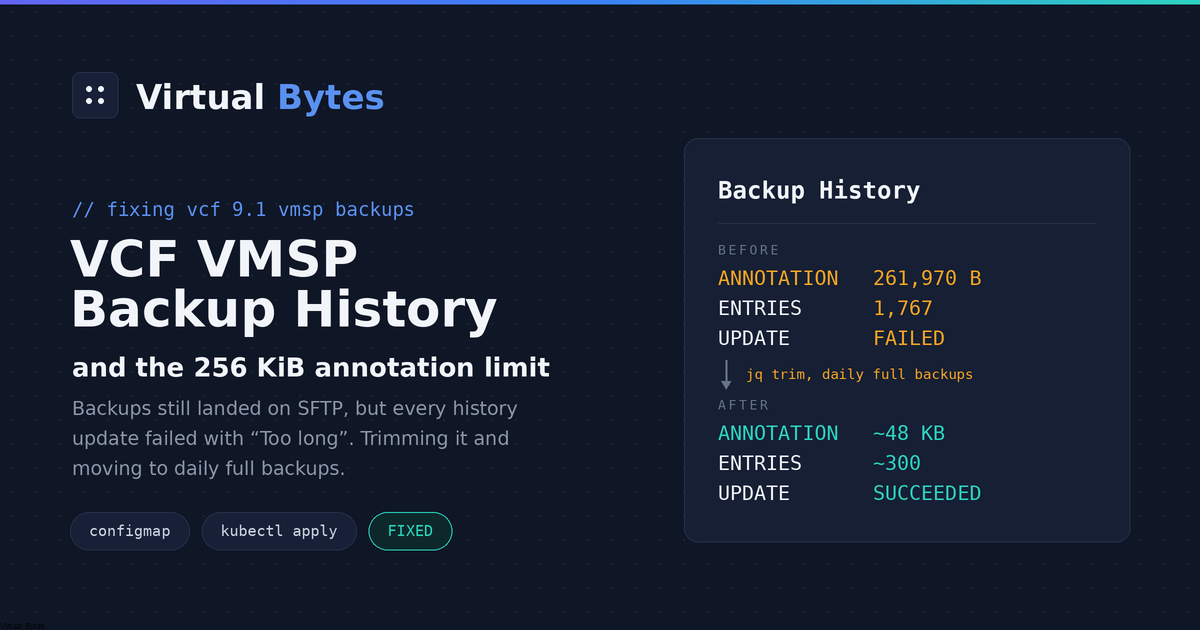
If you run frequent incremental backups of the VCF management components, the per-component backup history ConfigMap eventually grows past Kubernetes’ 256 KiB annotation limit. From then on, the final update-backup-history step of every backup fails, VCF Operations reports the backups as failed, and vmsp-platform fills up with Error pods.
The backups themselves still land on your SFTP server. The fix is to trim the history once and then move to a schedule that can’t refill it.
The symptom
The VMSP cluster looked unhealthy: dozens of pods in Error in the vmsp-platform namespace, all with names like this:
scheduled-incremental-backup-<component>-<id>-update-history-<n> 0/2 ErrorThere was one set of three for every incremental run of every component: salt, salt-raas, telemetry, the software depot, fleet lifecycle, SDDC lifecycle and identity broker. The warning events told the same story:
Failed node scheduled-incremental-backup-<component>(0).update-backup-history(0): main: Error (exit code 1)
Failed node scheduled-incremental-backup-<component>(0).update-backup-history: No more retries left
Things that looked guilty but weren’t
The cluster itself. All six nodes were Ready, with no memory, disk or PID pressure. Every Deployment and StatefulSet was at full replicas and every PVC was Bound.
SFTP and encryption. The backup-prechecks-*-sftp-precheck pods all passed:
INFO - SFTP is configured, backup encryption enabled=true.
INFO - The encryption passphrase is valid.
The backup workflows themselves ended in Succeeded.
vCenter trust. The platform-trust-vsphere-certificate-update cronjob logs this every 10 minutes:
Failed to decode vcenter certificate with existing public key. Signature verification failedThat looks alarming, but the thumbprint VMSP has stored (VSPHERE_TLS_THUMBPRINT on the cronjob) matched the live vCenter certificate exactly, and the job exits 0. In my lab, vCenter uses a certificate signed by an enterprise CA instead of VMCA, which I suspect is what triggers the message. Either way, it had nothing to do with the backups.
The real error
The answer was in the logs of the failing update-history pod’s main container:
INFO - backup_history_configmap_name=<component-id>-backuphistory
INFO - Update history
INFO - Creating incremental backup entry
INFO - Pruning backup history older than <now minus 30 days>
INFO - Writing updated history to configmap
The ConfigMap "<component-id>-backuphistory" is invalid: metadata.annotations: Too long: may not be more than 262144 bytes
Error: exit status 1
Root cause: kubectl apply keeps a full copy of the object
Each component has a ConfigMap in vmsp-platform called <component-id>-backuphistory (label vmsp.vmware.com/backup-history=true). It has a single key, history, holding a JSON document: one entry per full backup, each with a list of its incremental backups.
The history job writes that ConfigMap with client-side kubectl apply. Client-side apply stores the entire object it applied in the kubectl.kubernetes.io/last-applied-configuration annotation. So the history is effectively stored twice, and the annotation copy is the bigger one, because the pretty-printed JSON gets escaped again inside a string.
The two limits that matter:
| Limit | Size |
|---|---|
| ConfigMap total size | 1 MiB |
| All annotations on an object | 256 KiB (262,144 bytes) |
The annotation limit is the one you hit, long before the ConfigMap itself is anywhere near full.
The math
The default incremental schedule here was */15 * * * *, and the job keeps 30 days of history. Here’s what I measured on one component:
| Full-backup entries | 36 |
| Incremental entries | 1,731 |
history data | 231,200 bytes (about 133 bytes per incremental entry) |
last-applied-configuration annotation | 261,970 bytes, 174 bytes under the limit |
Seven of my ten history ConfigMaps were sitting within about a kilobyte of 262,144. At four incrementals an hour, 30 days of history works out to roughly the limit, so anyone on a 15-minute schedule hits this after about four weeks, and the 30-day pruning can’t keep up. Here’s how to check yours:
export KUBECONFIG=/etc/kubernetes/admin.conf
for cm in $(kubectl -n vmsp-platform get cm -o name | grep -- -backuphistory$); do
  j=$(kubectl -n vmsp-platform get $cm -o json)
  printf '%-55s data=%-7s annot=%s\n' "${cm#configmap/}" \
    "$(echo "$j" | jq -r '.data.history' | wc -c)" \
    "$(echo "$j" | jq -r '.metadata.annotations["kubectl.kubernetes.io/last-applied-configuration"] // ""' | wc -c)"
done
If annot is close to 262,144, you’re affected or about to be.
The history also tells you when it started. The last full backup recorded in the affected ConfigMaps was three days before I noticed. Every backup since then had run and been stored, but none of them had been recorded.
The fix
Everything below is reversible, because you take a copy of every history ConfigMap before changing anything.
Step 1: Back up every history ConfigMap
mkdir -p backuphistory-backup && cd backuphistory-backup
for cm in $(kubectl -n vmsp-platform get cm -o name | grep -- -backuphistory$); do
  kubectl -n vmsp-platform get $cm -o json > "${cm#configmap/}.json"
done
Step 2: Trim old incrementals, keep every full backup
This jq filter keeps every full-backup entry and drops only incremental entries older than a cutoff (7 days here). It also removes the oversized last-applied-configuration annotation:
CUT=$(date -u -d '7 days ago' +%Y-%m-%dT%H:%M:%SZ)
F='.data.history |= (fromjson
     | .backups |= map(if (.incrementalBackups|type)=="array"
                       then .incrementalBackups |= map(select(.startTime >= $cut))
                       else . end)
     | tojson)
   | del(.metadata.annotations["kubectl.kubernetes.io/last-applied-configuration"])'

kubectl -n vmsp-platform get cm <component-id>-backuphistory -o json \
  | jq --arg cut "$CUT" "$F" \
  | kubectl replace -f -
Why this approach is safe:
kubectl replace, notapply.replacedoesn’t add alast-applied-configurationannotation of its own, so the object you write is just the trimmed data.- It checks the version. The JSON you pipe in still has the
resourceVersionyou just read. If the backup job writes to the ConfigMap at the same moment, the replace is rejected instead of overwriting the job’s change. - The annotation comes back on its own. On the next backup, the job’s
kubectl applyrecreateslast-applied-configurationat the new, much smaller size.
Only trim ConfigMaps that are near the limit. One of mine was at 242 KB with no backups recorded for two months. Its component ID didn’t match any namespace on the cluster, so it’s a leftover history from a component that no longer exists and nothing writes to it any more. It can’t trigger the error, so I left it alone.
My results:
| Before | After | |
|---|---|---|
history per component | about 231 KB | 21–27 KB |
| Incremental entries | about 1,735 | 220–290 |
| Full-backup entries | 32–36 | 32–36 (all kept) |
Step 3: Fix the schedule, or it fills up again
Trimming only buys time. On a 15-minute schedule the history is back at the limit in 3–4 weeks.
Change it in VCF Operations → Build → Lifecycle → VCF Management → Backup & Restore (VCF Management Services Backup Schedule). I went with:
- Schedule: daily at 8:00 PM
- Incremental backup: Off
- Retention: 6 backups
It takes a few minutes to reach the cluster. You can confirm it there:
kubectl -n vmsp-platform get defaultbackupconfigurations.backuprestore.vmsp.vmware.com vmsp-default -o jsonpath='{.spec}'
kubectl -n vmsp-platform get cronworkflows.argoproj.io \
  -o custom-columns=NAME:.metadata.name,SCHEDULE:.spec.schedules,SUSPEND:.spec.suspend | grep backup
The incremental CronWorkflows should show suspend=true, and the scheduled-backup-* ones should show your time converted to UTC. My 8 PM local showed up as 0 3 * * SUN,MON,TUE,WED,THU,FRI,SAT.
Note: don’t edit vmsp-default directly. It’s managed by the vmsp-backup Helm release through Flux, so a manual edit gets reverted.
With one full backup a day and no incrementals, each history holds about 30 entries, which is nowhere near the limit.
Step 4: Verify and clean up
After the next backup that writes history, check the update-history pods and the annotation size:
kubectl -n vmsp-platform get pods | grep update-historyLook for Succeeded on the newest pod, and an annotation size in the tens of KB instead of about 262 KB. The first component to write after my trim recreated its annotation at about 48 KB.
Then delete the leftover failed pods. Only pods that are in the Failed phase and are update-history pods:
kubectl -n vmsp-platform get pods --field-selector status.phase=Failed -o name \
  | grep -- -update-history- | xargs -r kubectl -n vmsp-platform delete
Side notes from the troubleshooting
- Getting
kubectlon a VMSP node. SSH in asvmware-system-user, then usesudowithKUBECONFIG=/etc/kubernetes/admin.conf. Plainkubectlas that user trieslocalhost:8080and fails. You don’t need to copyadmin.confanywhere: running read-only commands throughsudoover SSH leaves nothing behind on the appliance. - “Connection closed” straight after the password prompt. If your SSH agent holds several keys, they can use up the node’s
MaxAuthTriesbefore the password is even tried. Use-o PreferredAuthentications=keyboard-interactive,password. - Stop retrying sudo after a couple of failures. Photon uses
faillock, and a lockedvmware-system-useralso locks you out of SSH. - Map component IDs to names before you panic. The ConfigMaps are named by component ID, not by name. Each component namespace carries a
component.vmsp.vmware.com/idlabel, sokubectl get ns -L component.vmsp.vmware.com/idtells you which history belongs to what. A history with no matching namespace is an orphan, not a component that has stopped backing up. - Lowering retention deletes old backups on the next run. Going to 6 backups, the first backup run’s
retention-processingstep found 29 backups per component on SFTP and deleted 23. Make sure that’s what you want before you save the new setting. - One retention-processing pod may fail once. On that first run, one attempt failed within seconds with rclone
directory not found(exit status 3), right after its component’s upload finished. Argo retried it 40 seconds later and it completed normally, and the workflow endedSucceeded. The leftoverErrorpod is safe to delete.
Wrap-up
This is a design flaw, not a misconfiguration. A history that only grows, written with client-side kubectl apply, will hit the 256 KiB annotation limit sooner or later. How soon depends on how often you take incrementals. If you run incremental backups of your VCF management components, check your *-backuphistory ConfigMaps now, before the error pods pile up.
Tested on VCF 9.1.1 (VMSP Kubernetes v1.35.6+vmware.2). Behaviour may change in later patches.